3: Functions#
Learning goals:#
Explain why we need functions in our programs
Identify key components of a function in Python
Construct a function block, from scratch
Convert existing code to a function
Use a function
Identify common errors with functions
What are functions and why do we care about them?#
Functions are basically machines that take some input(s), do some operations on the input(s), and then produce an output.
Why we need functions:
Model your problem so that it can be solved by a computer well aka Computational Thinking
Make fewer errors (reduce points of failure from copy/paste, etc.)
Motivating example: simple data analysis pipeline to compute percent change in revenue from last year.
We have two sales numbers
last_year = "$150,000"this_year = "$230,000"
Q: How can we analyze them? What are the subproblems here that we’ll need to solve?
A:
Two main substeps:
CONVERT strings to integers
COMPUTE the percent change
Here’s an example program that could solve this problem:
 1# DEFINE the two sub-functions we need
 2
 3def clean_sale_number(saleNumStr):
 4
 5    # 1: remove dollar signs
 6    saleNumStr = saleNumStr.replace("$", "")
 7
 8    # 2: remove the comma
 9    saleNumStr = saleNumStr.replace(",", "")
10
11    # 3: convert to float
12    result = float(saleNumStr)
13
14    return result
15
16def compute_percent_change(lastYear, thisYear):
17
18    # first make the input numbers actually numbers
19    lastYear = clean_sale_number(lastYear)
20    thisYear = clean_sale_number(thisYear)
21
22    # then compute the percent change
23    result = ((thisYear - lastYear)/lastYear)*100
24    return result
25
26# actually use (CALL) the functions.
27
28lastYear = "$500,000.35"
29thisYear = "$1,256,000.21"
30percentChange = compute_percent_change(lastYear, thisYear)
31print(percentChange)
151.19986616009368
Without functions, we would need to copy/paste the clean sales operation. This is both annoying and increases the likelihood of errors!
 1def compute_percent_change(lastYear, thisYear):
 2
 3    # make the input lastYear actually a number
 4
 5    # 1: remove dollar signs
 6    lastYear = lastYear.replace("$", "")
 7
 8    # 2: remove the comma
 9    lastYear = lastYear.replace(",", "")
10
11    # 3: convert to float
12    lastYear = float(lastYear)
13
14    # make the input thisYear actually a number
15
16    # 1: remove dollar signs
17    thisYear = thisYear.replace("$", "")
18
19    # 2: remove the comma
20    thisYear = thisYear.replace(",", "")
21
22    # 3: convert to float
23    thisYear = float(thisYear)
24
25    # then compute the percent change
26    result = ((thisYear - lastYear)/lastYear)*100
27    return result
You’ll really start to feel a practical need for functions once your programs start to approach a regular level of complexity, starting in Module 2 or so.
But it’s a fundamental concept for computational thinking (specifically problem decomposition), so it’s worth encountering it early, so we can start drilling that way of thinking. It also makes the PCEs a little less confusing!
Let’s take a closer look at what a function actually is in Python.
Function definition#
In Python, a function consists of three main components:
Parameters: what are the main input variables your function will be manipulating?
Body of the function: what operations will your function be performing on/with the input variables?
Return value: what will your function’s output be (i.e., what will come out of the function to the code that is calling the function)?
Let’s consider an example of a function to convert minutes to hours.
1def minutes_to_hours(minutes):
2    result = minutes/60
3    return result
The function minutes_to_hours() has input parameter minutes, a body of code that divides minutes by 60 and stores it in the variable result, and a return value that is the value of the variable result
So that’s the conceptual bits of a function. There’s also the syntax bits that make up a function definition. To see what they are, let’s compare the function definition to two other function definitions.
1def greet_user(username):
2    msg = "Hello " + username + "!"
3    return msg
1def longer(inputString, howMany):
2    toAdd = "a"*howMany
3    result = inputString + toAdd
4    return result
There’s a fair bit to notice here.
Q: What do you see here that you think is important?
A:
def
return, indented under the function name
name of the function
parentheses after the function name
one or more parameters inside the parentheses
colon
indented code as the body of the function (everything between the colon and the return statement)
Let’s practice with another function definition.
1def greet_user(username):
2    msg = "Hello " + username + "!"
3    return msg
Q: What are the parameters, function body, and return value(s) here?
A:
Parameter(s): username
Function body:
msg = "Hello " + username + "!"Return value: msg
And another example:
1def longer(inputString, howMany):
2    toAdd = "a"*howMany
3    result = inputString + toAdd
4    return result
Q: What are the parameters, function body, and return value(s) here?
A:
Parameter(s): inputString, howMany
Function body: lines 2 and 3
Return value: result
NOTE: when you run a function definition, there should be no output. The same thing is happening as with a variable assignment statement, like a = 3. Python is storing the code in the function body (and its associated parameters and return values) to be used later, just like with a = 3, Python is storing the value of 3 in the variable a to be used later.
So. When you write a colon after a function name, and indent code after it, it’s equivalent to an assignment statement (you’re assigning the code body and return statement to the function name).
Function call#
In Python, function calls consist of at least:
A reference to the function name
One or more arguments (inside parentheses) to pass as input to the function (how many and what type is determined by the parameters in the function definition) Alongside other code
Let’s look at an example.
Suppose we have defined a function minutes_to_hours.
1def minutes_to_hours(minutes):
2    result = minutes/60
3    return result
As we’ve noted, when we run this code by itself, the code in the function definition doesn’t actually run: instead, Python is saving the function to memory and associating it with the label minutes_to_hours.
To run the code and use the function, we need to write code that calls (i.e., uses) the function, like this:
1mins = 150
2# call the minutes_to_hours function
3# with mins as an argument
4# and store the return value in the variable hours
5hours = minutes_to_hours(mins)
6print(hours)
2.5
Here, we have the function name (minutes_to_hours), and the argument mins being passed as input to the function, and code that takes the return value from the function and prints it out.
Here it is in pictures
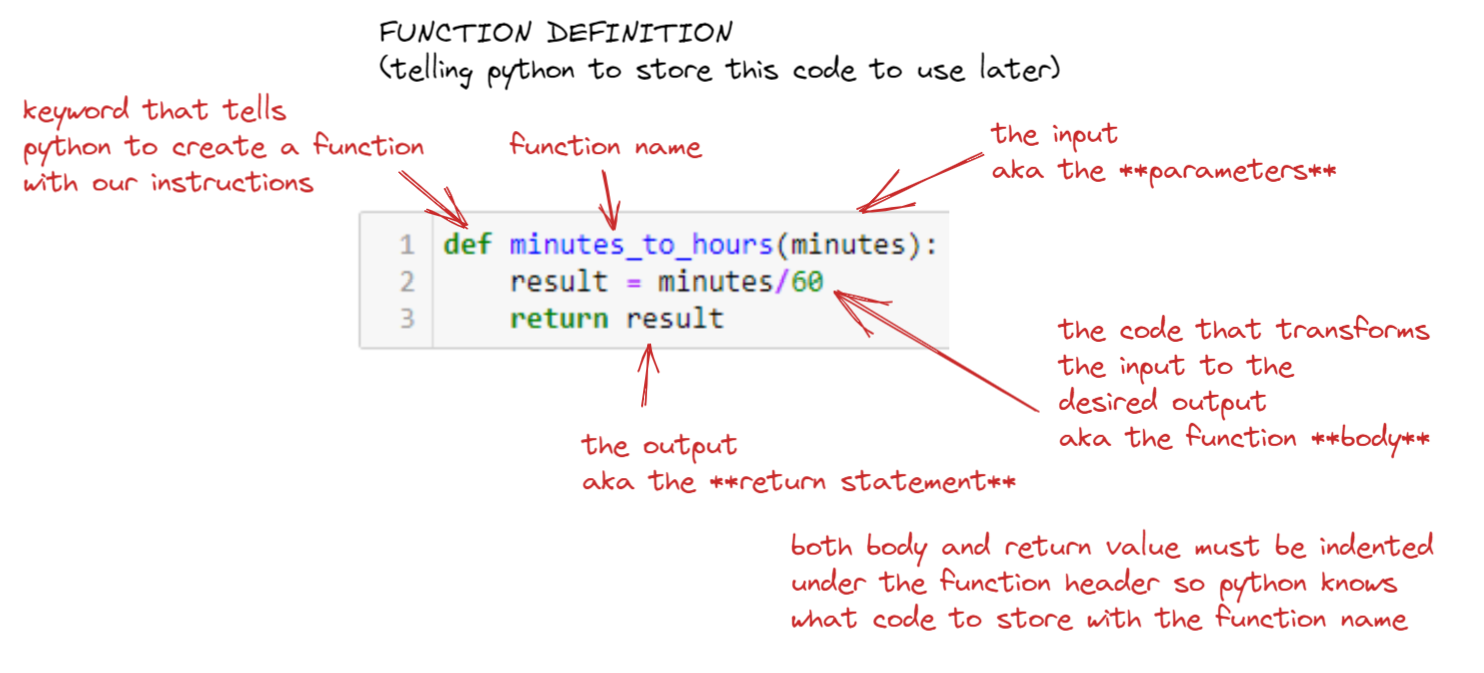
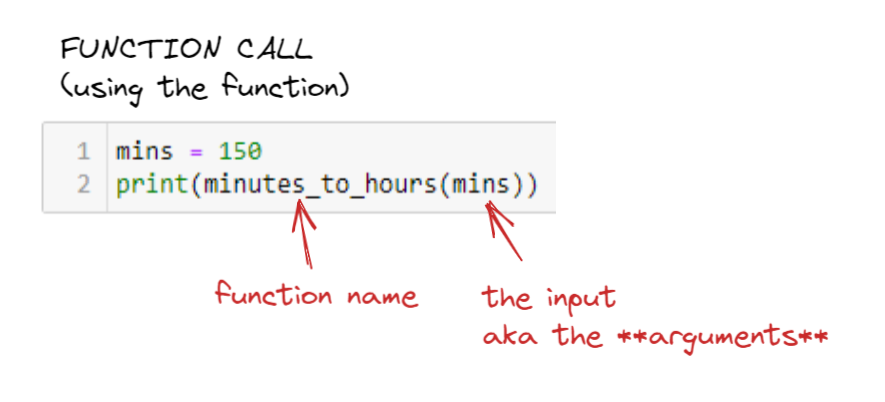
What’s happening under the hood at this function call is:
Define the variable
minsand put the value 150 in itRetrieve the code associated with the function name
minutes_to_hoursand give itminsas an input argumentRun the code associated with the function name
minutes_to_hourswithminsas input, and return the resultPass that result to the
printfunction (yes, this is a function also!) as an input argument.
I recommend that you plug this code (and really all the other examples in this lecture) into pythontutor to step through it line by line. It really helps to build your intuition for what is happening.
Let’s look at another example pair.
1def bouncer(age):
2    result = age >= 21
3    return result
1your_age = 24
2come_in = bouncer(your_age)
3print(come_in)
True
Key idea: Arguments vs. parameters#
Parameters and arguments are easy to confuse. They both go in the parentheses after the function name. So what’s the difference?
It helps me to think of them as two sides of a special kind of variable assignment statement.
Parameters are the key variables in the function (what’s on the left side of an assignment statement). Arguments are the values you assign to those variables when you use the function (what’s on the right side of an assignment statement).
As a beginner, it’s common to wonder when you look at a function definition, “Where do the variables in the function get their value? I don’t see any assignment statements?” Arguments and parameters are the answer! At least some of the function’s variables are parameters, and they get their value from the arguments in the function call.
Let’s look at our minutes_to_hours example again, all together:
Here’s another example.
1def minutes_to_hours(minutes):
2    result = minutes/60
3    return result
4
5mins = 150
6hours = minutes_to_hours(mins)
7print(mins, "minutes is", hours, "hours")
150 minutes is 2.5 hours
In this program, when line 6 (hours = minutes_to_hours(mins)) executes, Python calls the function and passes the argument mins into the function and gives its value to the minutes parameter in the minutes_to_hours function.
If you want to make life easier for yourself when you’re still learning, you can make the mapping from arguments (on the right) to parameters (on the left) in a function call explicit in the function call code
1minutes_to_hours(minutes=90)
1.5
Equivalently:
1mins = 120
2minutes_to_hours(minutes=mins)
2.0
And:
1my_age = 19
2bouncer(age=my_age)
False
We’ll actually see this format (called “keyword arguments”) come back later on when we deal with more complicated functions, especially when we borrow code from other libraries! This is in contrast to the “positional argument” approach for simpler functions, where Python gives the 1st argument’s value to the 1st parameter’s value, 2nd argument to the 2nd parameter, and so on.
The basic pattern for using functions: DEFINE a function, use (CALL) a function#
So we’ve seen that there are two main parts of using functions in programming: 1) DEFINING a function, and then 2) CALLING (using) a function.
Here’s another example:
 1# DEFINE a function that takes an input string and adds a specified number of characters to it
 2def longer(inputString, howMany):
 3
 4    # create a string that is
 5    # howMany characters long (by multiplying a single character string by that length)
 6    toAdd = "a"*howMany
 7
 8    # concatenate that "toAdd" string to the input string
 9    # and store in the result variable
10    result = inputString + toAdd
11
12    # return the result
13    return result
 1# define a string
 2s = "huzzah"
 3
 4# look at the current length of the string, using the len() function
 5print("S is originally", len(s), "characters long. Here it is:", s)
 6
 7# define how much longer we want to make the string
 8howMany = 3
 9
10# CALL the longer() function to make a string that is that many characters longer than the string s
11# and store the return value in the new variable longer_s
12longer_s = longer(s, howMany)
13
14# look at the length of the longer string, using the len() function
15print("S is now", len(longer_s), "characters long after adding", howMany, "characters. Here it is:", longer_s)
S is originally 6 characters long. Here it is: huzzah
S is now 9 characters long after adding 3 characters. Here it is: huzzahaaa
The first chunk of code defines the function longer(). The second chunk of code calls the function on line 12 (longer_s = longer(s, howMany)).
This define-call sequence should look similar to our PCE structure: your solutions.py files define functions, and your tests.py files call those functions to test them with different inputs.
In later more complex programs, you often define a few functions at once, or borrow them from other bits of code, and then use them in a single program. You can also compose functions into larger functions!
Practice#
Let’s practice! Look at the following two chunks of code.
1# A
2def greet_user(username):
3    msg = "Hello " + username + "!"
4    return msg
1# B
2username = "Joel"
3greeting = greet_user(username)
4print(greeting)
Hello Joel!
Q: Which one is the function definition and which one is the function call?
A:
A is the function definition, and B has code that calls the function.
Q: Which line in the function call cell is actually calling the function?
A:
Line 3!
Let’s go back to our example sales cleaning program.
 1# DEFINE the two sub-functions we need
 2
 3def clean_sale_number(saleNumStr):
 4
 5    # 1: remove dollar signs
 6    saleNumStr = saleNumStr.replace("$", "")
 7
 8    # 2: remove the comma
 9    saleNumStr = saleNumStr.replace(",", "")
10
11    # 3: convert to float
12    result = float(saleNumStr)
13
14    return result
15
16def compute_percent_change(lastYear, thisYear):
17
18    # first make the input numbers actually numbers
19    lastYear = clean_sale_number(lastYear)
20    thisYear = clean_sale_number(thisYear)
21
22    # then compute the percent change
23    result = ((thisYear - lastYear)/lastYear)*100
24    return result
25
26lastYear = "$500,000.35"
27thisYear = "$1,256,000.21"
28percentChange = compute_percent_change(lastYear, thisYear)
29print(percentChange)
151.19986616009368
Q: Where are the function calls?
A:
On line 28 (compute_percent_change(lastYear, thisYear)), but also inside the body of the compute_percent_change() function definition on lines 19 and 20, calling the clean_sale_number() function for both lastYear and thisYear variables!
Practice: tracing function definitions and calls#
Each program below defines two functions and calls each of them twice, with different arguments every time. In every program the first function works out a number, and the second function takes that number and does something with it.
Your job is to work out, for every call, which values land in which parameters (via arguments in function calls) and what comes back out (via return values).
How to annotate#
Mark up the code first. At this stage you are only labelling parts of the program.
In each function definition:
Box the
defline, and underline the parameters inside its parentheses.Mark the
returnline.
Everywhere a function is called:
Circle the call, and underline the arguments inside its parentheses.
Then fill in the trace table for each function call, one row per call, to trace how values land into function parameters and then what return values come back out.
Two of the columns need a bit of care:
Arguments: write down what is actually inside the parentheses of the call. This could be a literal value typed straight into the call, or a variable!
Parameter values: write these as
parameter = value, with the parameter on the left and the value it received on the right. That’s the same shape as a variable assignment statement, which is not a coincidence: this is exactly what a function call is doing to its parameters (assigning a value to a variable)!
For example, here are two calls to the minutes_to_hours function from earlier:
1mins = 150
2minutes_to_hours(90)
3minutes_to_hours(mins)
Traced out, they look like this:
# |
Function called |
Arguments |
Parameter values |
Return value |
|---|---|---|---|---|
1 |
|
|
|
|
2 |
|
|
|
|
Note row 2 - the arguments column says mins (what’s written in the call), but the parameter values column says minutes = 150 (the value that actually landed in the parameter).
Program 1: Streaming royalties#
 1def total_streams(listeners, plays_each):
 2    streams = listeners * plays_each
 3    return streams
 4
 5def royalties(stream_count):
 6    payout = stream_count * 0.004
 7    return payout
 8
 9song_a = total_streams(500, 4)
10pay_a = royalties(song_a)
11
12numListeners = 1200
13playsPerListener = 5
14song_b = total_streams(numListeners, playsPerListener)
15pay_b = royalties(song_b)
16
17print(pay_a, pay_b)
# |
Function called |
Arguments |
Parameter values |
Return value |
|---|---|---|---|---|
1 |
||||
2 |
||||
3 |
||||
4 |
What does the last line print?
Answer:
total_streams
Parameters:
listeners,plays_each. Returns the value instreams.Called twice:
total_streams(500, 4)andtotal_streams(numListeners, playsPerListener).
royalties
Parameter:
stream_count. Returns the value inpayout.Called twice:
royalties(song_a)androyalties(song_b).
# |
Function called |
Arguments |
Parameter values |
Return value |
|---|---|---|---|---|
1 |
|
|
|
|
2 |
|
|
|
|
3 |
|
|
|
|
4 |
|
|
|
|
The last line prints 8.0 24.0.
Note the comparison between rows 1 and 3, which illustrate two ways to put arguments into a function call:
Row 1’s arguments are typed straight into the call.
Row 3’s are variables.
The function doesn’t care about the difference - it only cares that values land into its parameters (and it’ll yell at you if a parameter is missing a value when the function is called!).
Rows 2 and 4 are a similar idea to Row 3 re: arguments for function calls: the argument written in the code is song_a, a variable, but the parameter stream_count does not get the variable. It gets the variable’s value, which here came from the return of the call above it.
Program 2: Shipping a box#
 1def box_weight(item_count, item_weight):
 2    total = item_count * item_weight
 3    return total
 4
 5def shipping_cost(weight):
 6    cost = 3 + weight * 0.5
 7    return cost
 8
 9order_a = box_weight(4, 2)
10price_a = shipping_cost(order_a)
11
12numItems = 10
13weightEach = 1.5
14order_b = box_weight(numItems, weightEach)
15price_b = shipping_cost(order_b)
16
17print(price_a, price_b)
# |
Function called |
Arguments |
Parameter values |
Return value |
|---|---|---|---|---|
1 |
||||
2 |
||||
3 |
||||
4 |
What does the last line print?
Answer:
box_weight
Parameters:
item_count,item_weight. Returns the value intotal.Called twice:
box_weight(4, 2)andbox_weight(numItems, weightEach).
shipping_cost
Parameter:
weight. Returns the value incost.Called twice:
shipping_cost(order_a)andshipping_cost(order_b).
# |
Function called |
Arguments |
Parameter values |
Return value |
|---|---|---|---|---|
1 |
|
|
|
|
2 |
|
|
|
|
3 |
|
|
|
|
4 |
|
|
|
|
The last line prints 7.0 10.5.
Note rows 2 and 4, where the argument is a variable rather than a number typed into the call. The parameter doesn’t get the variable, it gets the variable’s value. If you wrote weight = order_a in your table, go back and write down the actual number (8).
Same deal on row 3 - item_count holds 10, not numItems.
Program 3: Minutes on the pitch#
 1def total_minutes(games, minutes_each):
 2    minutes = games * minutes_each
 3    return minutes
 4
 5def stamina_score(minutes_played):
 6    score = 100 - minutes_played / 20
 7    return score
 8
 9season_a = total_minutes(10, 60)
10fitness_a = stamina_score(season_a)
11
12numGames = 6
13minutesPerGame = 90
14season_b = total_minutes(numGames, minutesPerGame)
15fitness_b = stamina_score(season_b)
16
17print(fitness_a, fitness_b)
# |
Function called |
Arguments |
Parameter values |
Return value |
|---|---|---|---|---|
1 |
||||
2 |
||||
3 |
||||
4 |
What does the last line print?
Answer:
total_minutes
Parameters:
games,minutes_each. Returns the value inminutes.Called twice:
total_minutes(10, 60)andtotal_minutes(numGames, minutesPerGame).
stamina_score
Parameter:
minutes_played. Returns the value inscore.Called twice:
stamina_score(season_a)andstamina_score(season_b).
# |
Function called |
Arguments |
Parameter values |
Return value |
|---|---|---|---|---|
1 |
|
|
|
|
2 |
|
|
|
|
3 |
|
|
|
|
4 |
|
|
|
|
The last line prints 70.0 73.0.
Player B played fewer games but longer ones, so the two seasons come out close together.
Note also that every call starts fresh - the second call to a function has no memory of the first one:
gamesholds10during call 1.gamesholds6during call 3.
Nothing carries over in between (and it makes no difference that call 1 got its 10 typed straight into the call, while call 3 got its 6 from a variable).
Program 4: Yarn for a project#
 1def yarn_needed(rows, yards_per_row):
 2    yards = rows * yards_per_row
 3    return yards
 4
 5def skeins_to_buy(total_yards):
 6    skeins = total_yards / 200
 7    return skeins
 8
 9scarf = yarn_needed(150, 4)
10scarf_skeins = skeins_to_buy(scarf)
11
12numRows = 300
13yardsPerRow = 6
14blanket = yarn_needed(numRows, yardsPerRow)
15blanket_skeins = skeins_to_buy(blanket)
16
17print(scarf_skeins, blanket_skeins)
# |
Function called |
Arguments |
Parameter values |
Return value |
|---|---|---|---|---|
1 |
||||
2 |
||||
3 |
||||
4 |
What does the last line print?
Answer:
yarn_needed
Parameters:
rows,yards_per_row. Returns the value inyards.Called twice:
yarn_needed(150, 4)andyarn_needed(numRows, yardsPerRow).
skeins_to_buy
Parameter:
total_yards. Returns the value inskeins.Called twice:
skeins_to_buy(scarf)andskeins_to_buy(blanket).
# |
Function called |
Arguments |
Parameter values |
Return value |
|---|---|---|---|---|
1 |
|
|
|
|
2 |
|
|
|
|
3 |
|
|
|
|
4 |
|
|
|
|
The last line prints 3.0 9.0.
Note that the names of arguments and parameters don’t have to match, and usually won’t:
On row 2, the argument is
scarf, but the parameter it lands in istotal_yards.On row 3,
numRowslands inrows, andyardsPerRowlands inyards_per_row.
What connects an argument to a parameter is its position in the call, not its spelling (which is why the order you write your arguments in matters!).
How to define functions#
Writing a function from scratch#
There are a few main steps to follow:
Write the code that goes in the function (the steps)
Create a function definition
Write the skeleton of your function (
def, a name, parentheses,returnstatement)
Integrate your code into the function:
Fill out the parameters
Fill out the body of the code
Fill out the return statement
Run the function definition cell (this defines the function for Python)
Let’s look at an example together!
Let’s write a function that applies a discount to a sale, given the sale amount and the percentage discount.
Here is code that successfully computes a saleAmount after applying a discount
1saleAmount = 10.00
2percentageDiscount = 0.3
3
4saleAmount - saleAmount*percentageDiscount
7.0
And here is a function definition that encapsulates that code into a function apply_discount(), with saleAmount and percentageDiscount as input parameters, the main computation from above applying the discount in the function body, and then defining the return value as the finalAmount.
1def apply_discount(saleAmount, percentageDiscount):
2    finalAmount = saleAmount - saleAmount*percentageDiscount
3    return finalAmount
Here’s an example of how we can call that function, using our explicit argument-parameter notation from before.
1apply_discount(saleAmount=325.99, percentageDiscount=.2)
260.79200000000003
And another simple one: give me the area of a triangle, given its base and height.
Here’s functioning code:
1b = 3
2h = 2
30.5*b*h
3.0
And here’s a function definition for a function triangle_area() that has base and height (renamed here from b and h for readability, and we make sure to propagate that change to the function body), and area as the return value.
1def triangle_area(base, height):
2    area = 0.5*base*height
3    return area
Here’s an example of calling that function.
1triangle_area(base=5, height=10)
25.0
Converting existing code into a function#
The steps here are similar to writing from scratch, with the main difference that we:
Decide which of the variables in the existing code are inputs (parameters), and which ones are outputs (return values), then put those in the function definition and return statements.
Integrate the rest of the working code into the body of the function.
Here we’ve written the code for our substeps of converting the numbers into.. numbers. We know it works.
 1# test number
 2rawSale = "$600,153.25"
 3
 4# make the input numbers actually numbers
 5# 1: remove dollar signs
 6cleanSale = rawSale.replace("$", "")
 7
 8# 2: remove the comma
 9cleanSale = cleanSale.replace(",", "")
10
11# 3: convert to float
12result = float(cleanSale)
13result # the output
600153.25
We can then encapsulate this into a function clean_sale_number(), with rawSale as the main input parameter, and the various operations cleaning the string in the function body, and the resulting float value as a return value.
 1# 1. decide which variables are inputs/outputs, fill out function skeleton
 2# 2. integrate rest of code into the body of the function
 3
 4# rawSale is input variable, so it's a parameter
 5def clean_sale_number(rawSale):
 6
 7    # 1: remove dollar signs
 8    cleanSale = rawSale.replace("$", "")
 9
10    # 2: remove the comma
11    cleanSale = cleanSale.replace(",", "")
12
13    # 3: convert to float
14    result = float(cleanSale)
15    return result
We can then call the function like this:
1clean_sale_number(rawSale="$2,115,000")
2115000.0
Practice: converting code to functions#
For each exercise below, you are given working code with test inputs. Your task is to:
Identify which variables are inputs (parameters) and which are outputs (return values)
Write a function definition that encapsulates the code
Call your function with different arguments to verify it works
Exercise 1: Gym discount eligibility#
A gym offers a discount if you are either a student or over 65 years old. Here is working code that checks discount eligibility based on student status and age:
1isStudent = False
2age = 66
3
4isEligible = isStudent == True or age > 65
5print(isEligible)
True
Convert this into a function, then call it with different arguments to test it.
Hint
What is the key operation for the function body? The boolean expression checking isStudent and age
Here is some starter code (parameters and return statement are done, just fill in the body of the function!).
1def check_discount(isStudent, age):
2    # replace with your code
3    return result
4
5# test calls
6check_discount(isStudent=True, age=35)   # True (student)
7check_discount(isStudent=False, age=66)  # True (over 65)
8check_discount(isStudent=False, age=30)  # False (neither)
600153.25
Exercise 3: Late penalty on an assignment#
Our syllabus has a late policy: 0.25% deduction per hour late. Here is working code that, given the number of hours late, the score, and the maximum score, calculates the final score after applying the late penalty:
1hoursLate = 3
2score = 30
3maximumScore = 50
4
5percentDeduction = hoursLate * 0.25
6pointsDeduction = percentDeduction / 100 * maximumScore
7finalScore = score - pointsDeduction
8print(finalScore)
Convert this into a function, then call it with different arguments to test it.
Hint
What are the inputs?
hours_late,score, andmaximumScoreWhat is the key operation for the function body? The lines of code computing the values for percentDeduction, pointsDeduction, and finalScore
What is the output? The final score after the late deduction
The body of the function should include the intermediate computation steps
Here is some starter code (fill in the right parameters, function body, return values, and function calls!)
 1# add parameters
 2def apply_late_penalty( ):
 3    # add function body
 4
 5    # add return statement
 6
 7
 8# test calls
 9# add in arguments!
10apply_late_penalty()
11apply_late_penalty()
Exercise 4: Total bill with tip and tax#
You’re at a restaurant and want to compute the total bill including tip and tax. Here is working code that computes the total:
1mealCost = 45.00
2tipRate = 0.18
3taxRate = 0.06
4
5tipAmount = mealCost * tipRate
6taxAmount = mealCost * taxRate
7totalBill = mealCost + tipAmount + taxAmount
8print(totalBill)
Convert this into a function, then call it with different arguments to test it.
Hint
What are the inputs?
mealCost,tipRate, andtaxRateWhat is the key operation for the function body? The lines computing tipAmount, taxAmount, and totalBill
What is the output? The total bill
Here is some starter code (fill in the right parameters, function body, return values, and function calls!)
 1# add parameters
 2def total_bill( ):
 3    # add function body
 4
 5    # add return statement
 6
 7
 8# test calls
 9# add in arguments!
10total_bill()
11total_bill()
Exercise 5: Distance traveled#
You want to compute how far a car travels, given its speed in miles per hour and the travel time in minutes. Here is working code that computes the distance:
1speedMph = 60
2timeMinutes = 90
3
4timeHours = timeMinutes / 60
5distance = speedMph * timeHours
6print(distance)
Convert this into a function, then call it with different arguments to test it.
Hint
What are the inputs?
speedMphandtimeMinutesWhat is the key operation for the function body? Converting minutes to hours, then multiplying speed by time
What is the output? The distance traveled
Here is some starter code (fill in the right parameters, function body, return values, and function calls!)
 1# add parameters
 2def distance_traveled( ):
 3    # add function body
 4
 5    # add return statement
 6
 7
 8# test calls
 9# add in arguments!
10distance_traveled()
11distance_traveled()
Exercise 6: Sale price after discount and tax#
You want to compute the final price of an item after applying a discount and then adding sales tax. Here is working code that computes the final price:
1originalPrice = 80.00
2discountPercent = 25
3taxRate = 0.06
4
5discountAmount = originalPrice * (discountPercent / 100)
6discountedPrice = originalPrice - discountAmount
7taxAmount = discountedPrice * taxRate
8finalPrice = discountedPrice + taxAmount
9print(finalPrice)
Convert this into a function, then call it with different arguments to test it.
Hint
What are the inputs?
originalPrice,discountPercent, andtaxRateWhat is the key operation for the function body? The lines computing discountAmount, discountedPrice, taxAmount, and finalPrice
What is the output? The final price after discount and tax
Here is some starter code (fill in the right parameters, function body, return values, and function calls!)
 1# add parameters
 2def final_price( ):
 3    # add function body
 4
 5    # add return statement
 6
 7
 8# test calls
 9# add in arguments!
10final_price()
11final_price()
Common errors when using functions#
Hard-coding parameters#
As a beginner, it’s common to look at a function definition, wonder why the variables don’t have assigned values, and write assignment statements to give them values inside the body of the function. We call this “hard-coding” the parameters (setting them to a fixed value, so they are no longer variables, but hard-coded values).
This is bad, because the function will no longer do its job of producing an output based on operations on the given inputs: it will only do operations on the hard-coded parameters, so it will produce the same result no matter what arguments are passed in during a function call!
As an example, the following function will always produce 2 as its output, no matter what arguments we pass in.
1def minus(x, y):
2    x = 3
3    y = 1
4    result = x - y
5    return result
This is because we are redefining x and y in the body of the function and giving them hard-coded values of 3 and 1. This makes the function ignore any argument values that are assigned to the parameters, and only use the hard-coded values, since the hard-coding happens after the arguments’ values are passed to the parameters when the function is called.
So this function will only subtract precisely 3 from 1, rather than subtracting any number y from x. For instance, this function call will yield 2 instead of 5, as we would expect:
1result = minus(10, 5)
2print(result)
Missing / incorrect return statements#
Technically, from a syntax perspective, the return statement in a function definition is optional. Functions that don’t have return values are syntactically valid (legal code); they’re known as a “void functions”.
Confusingly, in Python, a void function still does return a value: a special Python value called
Nonethat represents “nothing”.Honestly, void functions kind of break the model of what a function should be (subcomponents in a larger program). In my experience, they are also quite rare in practice, except as, say, a main control loop, or the “main” procedure in a script. So, if you’re confused by void functions and find “regular” (also sometimes called “fruitful”) functions (with return values) easier to think conceptualize, I’m happy.
For now, I want you to pretend void functions don’t exist (i.e., do not write void functions; always have a return statement).
So why am I telling you this then?
You’ll see void functions in many Python tutorials. Often you’ll even learn about void functions before fruitful (or regular) functions. I think this may be because it has fewer moving parts? I’m not really sure.
Practically, too, if you leave out a
returnstatement, your code will still run! So the syntax is fine! But you’ll probably have made a semantic error (you meant to give the output of the function to some other piece of code, but the code you wrote isn’t actually doing that). This is a very common error for beginning programmers. So you if run into this, you’re in good company! If you’re pretty sure that the code in the body of the function is correct, but you’re confused by what happens when the function is used (e.g., it’s not giving you the value you expect), but the code runs, it’s a good idea to check yourreturnstatement!
An extremely common way to make this mistake is to write a print statement in the function body to produce output to you, the user, and declare that it works, but forget to write a return statement
Example: if we define the functions this way, without return statements, they will still run! BUT we won’t be able to use their results in a meaningful way, leading to an error if we try
1def tip(base, percentage):
2    result = base * percentage
3    print(result)
4
5def tax(base, tax_rate):
6    result = base * tax_rate
7    print(result)
This code will yield a strange TypeError complaining about trying to do math with an int and a NoneType (because the functions produce None return values by default!)
1base = 3
2tip_rate = 0.2
3tax_rate = 0.08
4
5total_check = tip(base, tip_rate) + base + tax(base, tax_rate)
6print(total_check)
When you see this kind of error, it’s good practice to go back and check that your functions have return statements that produce the output you expect from the function.
NameErrors#
Functions are like variables, in that they are a way for Python to use a label (function name, variable name) to retrieve something from memory (a function, a value) to use in a program. So, just like variables, function calls can have a similar NameError, which just means that you’re asking Python to retrieve a function with a label, but there isn’t a box in memory with that label on it.
The same principles apply for variables as functions for this: make sure that your function is defined before you call it, and that the function call references the correct name of the function (not a misspelled one). Again, using autocomplete is your friend!
For instance, the following program will result in a NameError:
1def clean_sale_number(rawSale):
2
3    cleanSale = rawSale.replace("$", "")
4    cleanSale = cleanSale.replace(",", "")
5
6    result = float(cleanSale)
7    return result
8
9clean_sale(rawSale="$2,115,000")
Why? Because the function is defined with the label clean_sale_number, and we’re asking Python to go look for a function with the label clean_sale (which doesn’t exist!). Here, the fix would be to change line 9 to clean_sale_number(rawSale="$2,115,000").
Mismatching arguments and parameters#
Another common error is to call a function with a different number/order of arguments than the expected parameter number/order, which is a problem when you call functions in the common “positional argument” mode (just listing arguments in order of the parameters, as opposed to explicit “keyword arguments”)
For instance, if you define a function like this that expects x and y in that order:
1# example
2def minus(x, y):
3    result = x - y
4    return result
And call the function like this:
1minus(3)
When you run the program, it will halt with an error message: “TypeError: minus() missing 1 required positional argument: ‘y’”
The reason it fails with this TypeError in this case is because for the 2nd parameter, because it’s missing a corresponding 2nd argument.
The fix is to make sure that you have the same number of arguments as parameters. Again, writing out your function calls in explicit argument-parameter mappings can help make sure that you don’t make this error, like this:
minus(x=3, y=2)
But! You have to make sure you remember the name of the parameter and use that. Tradeoffs! :)
Practice: debugging functions#
For each exercise below, there is a buggy function and a function call that produces incorrect output or an error. Your task is to:
Identify what type of error it is (hard-coded parameters, missing/incorrect return, or NameError)
Fix the bug
Exercise 1: Gym discount eligibility#
A gym offers a discount if you are either a student or over 65 years old. Debug the following program:
 1def discount_eligibility(isStudent, age):
 2    isStudent = False
 3    age = 35
 4    result = isStudent == True or age > 65
 5    return result
 6
 7studentStatus = True
 8customerAge = 35
 9
10isEligible = discount_eligibility(isStudent=studentStatus, age=customerAge)
11print(isEligible)
The program call should print out True (the customer is a student), but it prints out False. What’s the bug and how do you fix it?
Hint:
Are the parameters in the function being used as expected by the code that calls it?
Exercise 2: Flour for cookies#
A recipe calls for 0.167 cups of flour for each cookie. Debug the following program that defines and calls a function to compute the desired number of cups for a given number of cookies to bake:
1def cups_per_cookie(num_cookies):
2    result = num_cookies * 0.167
3    print(result)
4
5target_num_cookies = 12
6
7num_cups = cups_per_cookie(num_cookies=target_num_cookies)
8print("We need", num_cups, "of flour to make", target_num_cookies, "cookies")
The program prints the correct number, but then also prints We need None of flour to make 12 cookies. Why does num_cups have the value None, and how do you fix it?
Hint:
Does the function definition produce the right outputs for the code that calls it?
Exercise 3: Late penalty#
Debug a program that calls a function to calculate the final score for an assignment after applying a late penalty (0.25% deduction per hour late):
 1def apply_late_penalty(hours_late, score, maximum_score):
 2    percent_deduction = hours_late * 0.25
 3    points_deduction = percent_deduction / 100 * maximum_score
 4    result = score - points_deduction
 5    return score
 6
 7num_hours_late = 2
 8initial_score = 55
 9possible_score = 60
10
11final_score = apply_late_penalty(num_hours_late, initial_score, possible_score)
12print(final_score)
The program prints out 55 (the original score) instead of a reduced score. What’s the bug and how do you fix it?
Hint:
Does the function definition produce the right outputs for the code that calls it?
Exercise 4: Movie theater group discount#
A movie theater offers a group discount if a party has 5 or more people or if at least one member is a loyalty cardholder. Debug the following program that defines and calls a function to compute a group discount (if applicable) based on party size and loyalty cardholder status:
 1def group_discount(group_size, has_loyalty_card):
 2    group_size = 3
 3    has_loyalty_card = False
 4    result = group_size >= 5 or has_loyalty_card == True
 5    return result
 6
 7num_in_group = 6
 8loyalty_card = False
 9discount = group_discount(num_in_group, loyalty_card)
10print("Discount eligibility for this group:", discount)
This prints False even though the group has 6 people (which is >= 5). What’s the bug and how do you fix it?
Hint:
Are the parameters in the function being used as expected by the code that calls it?
Exercise 5: Fitness tracker badge#
A fitness tracker awards a “goal achieved” badge if the user takes at least 10,000 steps. Debug the following program that defines and calls a function to check if a badge should be awarded based on steps so far:
1def goal_achieved(steps):
2    result = steps_today >= 10000
3    return result
4
5badge = goal_achieved(12000)
6print(badge)
Q: This produces a NameError: name 'steps_today' is not defined. What’s the bug and how do you fix it?
Hint:
Are the parameters in the function being used as expected by the code that calls it?
Exercise 6: Theme park ride eligibility#
A theme park allows kids to ride if they have a fast pass or are at least 48 inches tall. Debug the following program that defines and calls a function to check ride eligibility based on these factors:
1def ride_eligibility(fast_pass, height):
2    eligible = fast_pass or height >= 48
3    return eligible
4
5can_ride = ride_eligible(fast_pass=False, height=50)
6print("This person can ride:", can_ride)
Q: This produces a NameError: name 'ride_eligible' is not defined. What’s the bug and how do you fix it?
Hint:
Is the function you are trying to call appropriately defined?
Exercise 7: Tip calculator#
Debug the following program that calculates a total amount to pay, including tip:
1def tip(base_price, tip_prop):
2    result = base_price * tip_prop
3    print(result)
4
5check = 50
6tip_proportion = .18
7
8total = check + tip(base_price=check, tip_prop=tip_proportion)
9print("Total amount is", total)
Q: This prints 9.0 but then crashes with TypeError: unsupported operand type(s) for +: 'int' and 'NoneType'. What’s the bug and how do you fix it?
Hint:
Does the function definition produce the right outputs for the code that calls it?
Practice: more broken functions#
Each function below is broken in one of the ways described above. They are in no particular order, so part of the exercise is working out which kind of problem you are looking at before you try to fix it. Start from the evidence: what does the function actually do, and what did you expect instead?
Each hint points you back at the section that covers that kind of bug.
Exercise 8: Win percentage#
1def win_percentage(wins, losses):
2    total = wins + losses
3    result = wins / total * 100
Call |
Should return |
Actually returns |
|---|---|---|
|
|
|
|
|
|
Q: The right answer is calculated. Where does it go?
Hint:
Nothing is wrong with the arithmetic. See Missing / incorrect return statements above.
Exercise 9: Shots per game#
1def shots_per_game(total_shots, games):
2    result = total_shots / games
3    return total_shots
Call |
Should return |
Actually returns |
|---|---|---|
|
|
|
|
|
|
|
|
|
|
|
|
Q: Why does the third call give the right answer when the others don’t?
Hint:
One case passing is the clue – ask what is special about it. See Missing / incorrect return statements above.
Exercise 10: Yarn for a project#
1def yarn_cost(x, y):
2    cost = skeins * price_each
3    return cost
yarn_cost(4, 6) should return 24. Instead it raises:
NameError: name 'skeins' is not defined
Q: What’s the bug, and what are two different ways you could fix it? Which of the two makes the function easier to read?
Hint:
Compare the names in the parentheses on the def line with the names the body uses. See NameErrors above.
Exercise 11: Failed login rate#
1def percent_failed(failed_logins, total_logins):
2    fraction = failed_logins / total_logins
3    percent = fraction * 100
4    return fraction
Call |
Should return |
Actually returns |
|---|---|---|
|
|
|
|
|
|
|
|
|
|
|
|
Q: Every wrong answer is off by the same factor. What is it, and what does that tell you about which line the function stopped at?
Hint:
The function does all the work it needs to. See Missing / incorrect return statements above.
Exercise 12: Steps to miles#
1def steps_to_miles(steps):
2    miles = steps / 2000
3    print(miles)
4
5distance = steps_to_miles(6000)
6print("You walked", distance, "miles")
This prints 3.0, and then prints You walked None miles.
Q: The correct number 3.0 appears on screen, so why is distance None? What is the difference between print and return here?
Hint:
Showing a value and handing it back are two different things. See Missing / incorrect return statements above.
Exercise 13: Final grade#
1def final_grade(points_earned, y):
2    result = points_earned / points_possible * 100
3    return result
final_grade(45, 50) should return 90.0. Instead it raises:
NameError: name 'points_possible' is not defined
Q: One of the two parameters is fine. Which one is wrong, and why didn’t Python complain about y as well?
Hint:
An unused parameter is not an error. See NameErrors above.
Exercise 14: Playlist length#
1def playlist_minutes(num_songs, minutes_each):
2    result = num_songs * minutes_each
3    return minutes_each
Call |
Should return |
Actually returns |
|---|---|---|
|
|
|
|
|
|
|
|
|
|
|
|
Q: Which call gives the right answer, and what does that tell you about the bug?
Hint:
The body computes the total correctly. See Missing / incorrect return statements above.
Exercise 15: Average score#
1def average_score(total_points, num_games):
2    average = total_points / num_games
3    return
Call |
Should return |
Actually returns |
|---|---|---|
|
|
|
|
|
|
Q: This function does have a return statement. Why is the result still None?
Hint:
Finding the keyword is not the same as checking what follows it. See Missing / incorrect return statements above.
Exercise 16: Quiz score#
1def percent_correct(x, y):
2    result = num_correct / num_items * 100
3    return result
percent_correct(8, 10) should return 80.0. Instead it raises:
NameError: name 'num_correct' is not defined
Q: Python only complained about num_correct. If you fixed just that one name, what would happen next?
Hint:
There is more than one name here that the def line never introduced. See NameErrors above.