4: Conditionals#
Learning goals:#
Write Boolean expressions based on English requirements
Explain different meta-patterns of conditional blocks (nested, chained, with alternative vs. without)
Construct various types of conditional blocks in Python
What are conditionals and why do we care about them?#
Conditionals are an example of the fundamental computational thinking concept of control flow: setting up structures in our program to control what happens when. You can think of conditionals as “forks in the road” that control what happens depending on whether some conditions are true or false.
A set of pictures might help to give the intuition:

Basically anytime you find yourself at a problem step or part of your problem where you say something like “do something based on / depending on / looking at / if some condition”, that is a signal that you need a conditional.
Here are some examples:
decide what to wear: check temperature, check if i’m going to a dress code location
shopping: check how much money i have, check quality level of the thing, what i need; decide what to buy
decide what to eat: spiciness, taste, price
What are some other real-world examples of this sort of situation that you can think of?
Anatomy of a basic conditional block in Python#
Here’s a rough diagram of a basic conditional block in Python:
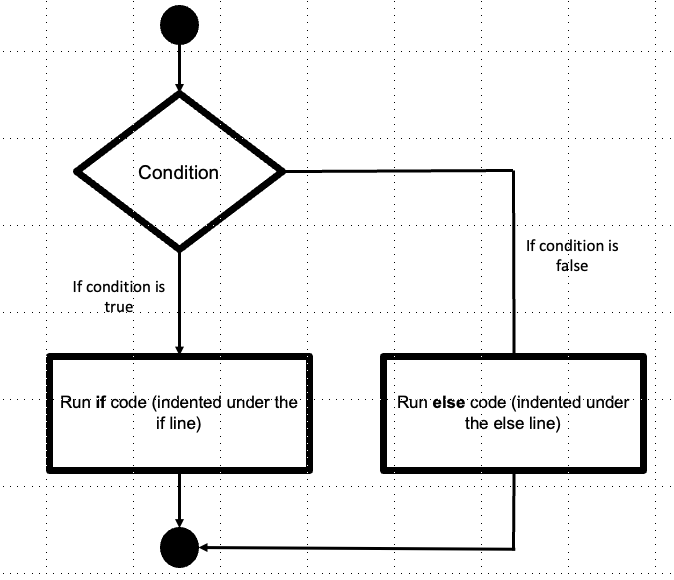
And here’s what it looks like in code. This is a generic structure for basic conditionals (which you can use as a template when you’re writing new conditional blocks of this type):
1# basic conditional block
2if BooleanExpression:
3    # do something
4    # maybe also something more
5else:
6    # do something else
7    # and maybe even more something else
The if statement
The if keyword signals that a conditional block is starting.
The Boolean expression determine where to go in the conditional block
Truegoes to the if branch;Falsegoes to the else branch
The statement needs to end in a colon to signal that the statement has ended. This is the same as with function definitions, and as we will see, with iteration loops also.
The “if” (
True) branch code: what should happen if the Boolean expression evaluates toTrue?Needs to be indented because of scope (same with functions; also will be true of loops)
The else statement:
Signals that an else branch will be specified next
Just the else keyword and a colon
The “else” (false) branch code: what should happen if the Boolean expression evaluates to
False?Also needs to be indented
Aside: indentation and branch code#
Notice the idea of branch code: it’s code that “belongs” to the branch. We only run it if we go into the branch.
In Python, we control what belongs to what with indentation. In other languages, you use things like curly braces (e.g., Java, Javascript).
Note: Unlike functions, if/else blocks do not create a new scope in Python. Variables assigned inside an if block are still accessible after the block finishes. The key thing indentation controls here is which code runs in which branch.
As an example, consider the following code: how many times do you think we will print the message “hello world”? Why?
 1# if i have passed all the requirements for graduation, print graduate! otherwise, print need to do more
 2# did i accumulate at least 25 credits AND earn at least a 3.0 GPA?
 3n_credits = 30
 4gpa = 3.95
 5hello = "hello world!"
 6if n_credits >= 25 and gpa >= 3.0:
 7    print("Go ahead")
 8    print(hello)
 9else:
10    print("Take more classes")
11    print(hello)
Go ahead
hello world!
The answer: only once! Because both print statements are indented inside a conditional branch, only one branch executes: either the if branch or the else branch, but never both.
Examples of conditionals#
Let’s look at some examples!
The following program checks if a number is even (and prints “It’s even!” if so, and “It’s odd!” if not).
1num = 3
2if num % 2 == 0:
3    print("It's even!")
4else:
5    print("It's odd!")
It's odd!
The following program checks if a password is correct (and prints “Come in” if so, and “Go away” if not).
1user_input = "hello"
2password = "bunny"
3# if the user input matches the password
4if user_input == password:
5    print("Come in")
6else:
7    print("Go away")
Go away
The following program implements a Waiter checking your age on your ID, and then shows beer/alcohol menu or says “have some water”
1age = 23
2drinking_age = 21
3if age >= drinking_age:
4    print("Here's the alcohol menu")
5else:
6    print("Have some water")
Here's the alcohol menu
A closer look at Boolean expressions#
All conditional blocks depend on well-crafted Boolean Expressions, which are expressions that evaluate to (i.e., result in, produce) a Boolean value (i.e., True or False). This is what really determines the logic of the conditional control of flow. So you need to make sure you’re proficient with Booolean expressions.
Boolean Operators#
We use Boolean Operators to compare TWO pieces of data. When evaluated, they yield a Boolean value (True or False).
data1 booleanOperator data2
Here are the main ones:
==equal to / the same as!=not equal to / different from>greater than>=greater than or equal to (at least)<less than<=less than or equal to (at most)
Logical operators#
We use Logical operators to combine basic Boolean expressions into more complex ones, like “is a more than 3 and less than 5”
Here are the main ones:
and(True if all Boolean expressions are True)or(True if any Boolean expression is True)not(True if the Boolean expression is not True)
Full list of comparison and logical operators here
Practice: Construct Boolean expressions#
Let’s practice! Translate these Boolean expressions from English into Python.
How to use the practice problems
Almost every practice problem in this chapter has a hidden Example solution underneath it. Write your own version first, then click to reveal and compare.
There’s usually more than one correct way to write these, so don’t worry if yours doesn’t match word for word. What matters is that it produces the right result for the given values, and would still produce the right result if those values changed.
Basic Boolean expressions (only Boolean operator)#
1# is the driver's speed above the limit?
2speed = 75
3limit = 45
4# boolean expression here
Example solution
1speed > limit
With speed = 75 and limit = 45, this evaluates to True. We compare the two variables rather than the literal numbers, so the expression still works if either value changes.
1# do i have a passport?
2has_passport = True # assign the value True to the passport variable
3# boolean expression here
Example solution
1has_passport
has_passport is already a Boolean value, so it’s already a Boolean expression. You don’t need has_passport == True; that’s redundant, though not wrong.
Compound Boolean expressions (Boolean operators + Logical operators)#
1# have i passed all the requirements for graduation?
2# which is operationalized as "do i have enough credits, with enough GPA?"
3num_credits = 120 # threshold of 120
4GPA = 1.5 # threshold of 2.0
5# boolean expression here
Example solution
1num_credits >= 120 and GPA >= 2.0
Two comparison expressions joined by and, because both requirements have to be met. With num_credits = 120 and GPA = 1.5, this evaluates to False: the credits check passes (>= includes exactly 120), but the GPA check fails.
1# did i take the prereq for the class OR get permission from the instructor?
2took_prereq = False
3have_permission = True
4# boolean expression here
Example solution
1took_prereq or have_permission
or because either path gets you in. With took_prereq = False and have_permission = True, this evaluates to True.
1# is the professor in the office and the door open more than a crack (at least 15 degrees) or there is a sign that says come on in or you have an appointment?
2prof_in_office = True
3door_angle = 5
4sign_says = "Come in"
5have_appointment = True
6# boolean expression here
Example solution
1prof_in_office and (door_angle >= 15 or sign_says == "Come in" or have_appointment)
With the given values this evaluates to True: the professor is in the office, and even though the door is only open 5 degrees, there’s a sign and you have an appointment.
The parentheses matter. The professor being in the office is required no matter what, and then any one of the three “you may enter” signals is enough. Without parentheses, Python evaluates and before or, so “there’s a sign” on its own would make the whole thing True and you could walk in on an empty office. The English is ambiguous here, and you have to settle it before you can write the code.
More practice: compound Boolean expressions#
Try these on your own! Each one requires combining Boolean operators with logical operators (and, or, not).
1. Can I ride the roller coaster?#
You can ride the roller coaster if you are at least 48 inches tall AND at least 8 years old. Write a Boolean expression that checks both conditions.
1height_inches = 50
2age = 7
3# boolean expression here
Example solution
1height_inches >= 48 and age >= 8
and because both requirements must be met. With height_inches = 50 and age = 7, this evaluates to False: tall enough, but not old enough.
2. Is the restaurant open?#
The restaurant is open if the hour is between 11 and 14 (lunch) OR between 17 and 21 (dinner). Write a Boolean expression that checks if the restaurant is currently open. Assume the hour is in 24-hour time (e.g., 13 = 1pm).
1hour = 13
2# boolean expression here
Example solution
1(hour >= 11 and hour <= 14) or (hour >= 17 and hour <= 21)
Each “between” check is itself a compound expression, and the two windows are joined with or because being in either window means the restaurant is open. With hour = 13, this evaluates to True.
Python also lets you chain comparisons, so (11 <= hour <= 14) or (17 <= hour <= 21) works too.
3. Can I get a discount?#
You get a discount if you are a student OR a senior (65 or older).
1is_student = False
2age = 70
3# boolean expression here
Example solution
1is_student or age >= 65
With is_student = False and age = 70, this evaluates to True, since or only needs one side to be True.
4. Should I bring an umbrella?#
You should bring an umbrella if it is raining OR if the chance of rain is above 50% and you don’t have a rain jacket.
1is_raining = False
2chance_of_rain = 75
3has_rain_jacket = False
4# boolean expression here
Example solution
1is_raining or (chance_of_rain > 50 and not has_rain_jacket)
With the given values this evaluates to True: it isn’t raining, but there’s a 75% chance and no jacket.
The parentheses matter here for the same reason as the professor’s office problem: “raining” is one standalone reason, and the jacket condition only modifies the chance of rain reason.
5. Can I register for the class?#
You can register for the class if you have taken the prerequisite AND (you are a junior or senior, based on credits: junior is at least 60, senior is at least 90).
1took_prereq = True
2credits = 55
3# boolean expression here
Example solution
1took_prereq and credits >= 60
“Junior or senior” just means “at least junior,” and junior starts at 60 credits, so a single credits >= 60 covers both. With credits = 55, this evaluates to False.
Writing it out literally as took_prereq and (credits >= 60 or credits >= 90) also gives the right answer, but the credits >= 90 part can never change the result: anything that passes it already passed credits >= 60.
6. Is the flight delayed?#
A flight is delayed if the wind speed is above 40 mph OR (visibility is below 3 miles AND it is not a clear day).
1wind_speed = 25
2visibility = 2
3is_clear = False
4# boolean expression here
Example solution
1wind_speed > 40 or (visibility < 3 and not is_clear)
With the given values this evaluates to True: the wind is fine, but visibility is 2 miles and it isn’t a clear day.
Practice: construct basic conditional blocks#
Now let’s practice constructing conditional blocks! Follow along with me to translate these English instructions into conditional blocks. We basically need to 1) decide what the condition is and translate it into a Boolean expression, then 2) decide what actions go in the True or False branches.
If my speed is above the limit, print stop; otherwise, let me pass.
1# if my speed is above the limit, print stop; otherwise, let me pass
2speed = 25
3limit = 45
4# conditional block below here
Example solution
1if speed > limit:
2    print("Stop!")
3else:
4    print("Go ahead")
With speed = 25 and limit = 45, the condition is False, so Python runs the else branch and prints Go ahead.
This is the two-step process: first the Boolean expression for the condition (which we already wrote above), then the actions for the True and False branches.
If i have a passport, print come on in; otherwise, print go away
1# if i have a passport, print come on in; otherwise, print go away
2# do i have a passport?
3has_passport = False # assign the value True to the passport variable
4# conditional block below here
Example solution
1if has_passport:
2    print("Come on in")
3else:
4    print("Go away")
has_passport is False here, so this prints Go away.
if i have passed all the requirements for graduation, print graduate! otherwise, print need to do more
1# if i have passed all the requirements for graduation, print graduate! otherwise, print need to do more
2# did i accumulate at least 120 credits AND earn at least a 2.0 GPA?
3# did i take the prereq for the class OR get permission from the instructor?
4num_credits = 110 # threshold of 120
5GPA = 1.9 # threshold of 2.0
6# conditional block below here
Example solution
1if num_credits >= 120 and GPA >= 2.0:
2    print("Graduate!")
3else:
4    print("Need to do more")
With num_credits = 110 and GPA = 1.9, both halves of the and are False, so this prints Need to do more.
More practice: basic if/else#
Try these on your own! Each one needs a basic if/else block.
1. Freezing check#
If the temperature is below freezing (32 degrees F), print “It’s freezing!”; otherwise, print “It’s not freezing.”
1temp = 28
2# conditional block below here
Example solution
1if temp < 32:
2    print("It's freezing!")
3else:
4    print("It's not freezing.")
With temp = 28, this prints It's freezing!
2. Pass or fail#
If the student’s score is at least 60, print “Pass”; otherwise, print “Fail”.
1score = 55
2# conditional block below here
Example solution
1if score >= 60:
2    print("Pass")
3else:
4    print("Fail")
With score = 55, this prints Fail. Watch the >=: “at least 60” means a 60 should pass, so score > 60 would be a subtle bug.
3. Number guessing game#
If the user’s guess matches the secret number, print “You got it!”; otherwise, print “Try again!”
1guess = 7
2secret_number = 4
3# conditional block below here
Example solution
1if guess == secret_number:
2    print("You got it!")
3else:
4    print("Try again!")
With guess = 7 and secret_number = 4, this prints Try again!
Remember: == asks a question (are these equal?), while a single = assigns a value. Using = here would be a syntax error.
4. Shopping decision#
If the item is on sale AND you have enough money (i.e., money is at least the price), print “Buy it!”; otherwise, print “Maybe next time.”
1on_sale = True
2price = 25
3money = 20
4# conditional block below here
Example solution
1if on_sale and money >= price:
2    print("Buy it!")
3else:
4    print("Maybe next time.")
With on_sale = True, price = 25, and money = 20, the second half of the and is False, so this prints Maybe next time.
More complex conditional structures#
The if / else conditional block is the most basic and easy to understand. But often your programs may require something a bit simpler, and sometimes a bit more complex.
Conditional execution#
The else branch is actually optional. Sometimes you just want to do something if it’s true, otherwise you do nothing.
The flow looks like this:
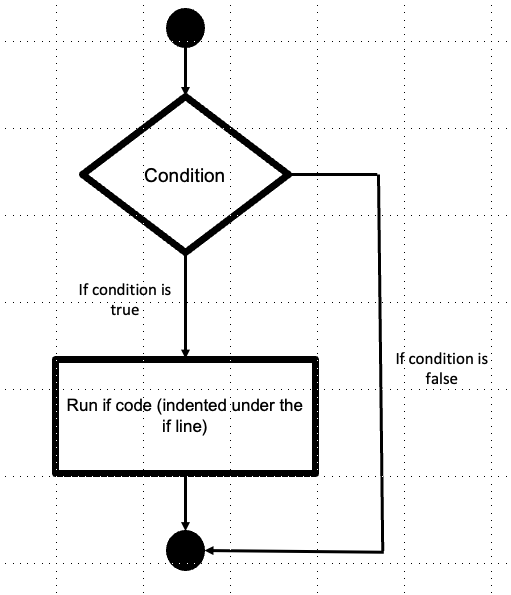
Some examples:
Only stop someone if they’re above the speed limit
Tell me if someone is coming!
Look through the bag and only pull out the red skittles
Can you think of any others?
# generic
if booleanExpression:
    # do something
1speed = 25
2limit = 30
3if speed > limit:
4    print("Stop!")
Keywords/phrases that signal that this is appropriate?
if only one “choice” (or action) is described, then probably you don’t need an else, since “doing nothing” is a default action
Practice: conditional execution (no else)#
Try these on your own! Each one only needs an if — no else needed.
1. Low battery warning#
If the battery level is below 20, print “Low battery warning!”
1battery_level = 15
2# conditional block below here
Example solution
1if battery_level < 20:
2    print("Low battery warning!")
With battery_level = 15, this prints the warning. There’s no else because when the battery is fine, the right behavior is to say nothing at all.
2. Dean’s list#
If the student is on the dean’s list (GPA of 3.5 or above), print a congratulations message.
1gpa = 3.8
2# conditional block below here
Example solution
1if gpa >= 3.5:
2    print("Congratulations, you made the dean's list!")
With gpa = 3.8, this prints the congratulations message.
3. Password length check#
If the password is less than 8 characters long, print “Warning: password is too short!” Hint: you can use len() to get the length of a string, e.g., len("hello") returns 5.
1password = "abc"
2# conditional block below here
Example solution
1if len(password) < 8:
2    print("Warning: password is too short!")
len(password) is 3 here, so this prints the warning. len() gives you a number, and it’s that number you compare against 8, not the string itself.
4. Free gift threshold#
If the order total is at least $50, print “Free gift added to your order!”
1order_total = 62
2# conditional block below here
Example solution
1if order_total >= 50:
2    print("Free gift added to your order!")
With order_total = 62, this prints the message.
5. Weekend check#
If it’s the weekend (Saturday or Sunday), print “No class today!”
1day = "Saturday"
2# conditional block below here
Example solution
1if day == "Saturday" or day == "Sunday":
2    print("No class today!")
With day = "Saturday", this prints No class today!
A common mistake here is writing day == "Saturday" or "Sunday". That’s valid Python, but it doesn’t do what you want: Python reads it as (day == "Saturday") or ("Sunday"), and a non-empty string always counts as True, so the message would print every day of the week. Each side of an or has to be a complete Boolean expression.
Chained conditionals#
Sometimes you have more than two mutually exclusive choices of paths (branches). In that case you need an elif.
The difference from the basic conditional is something like this:
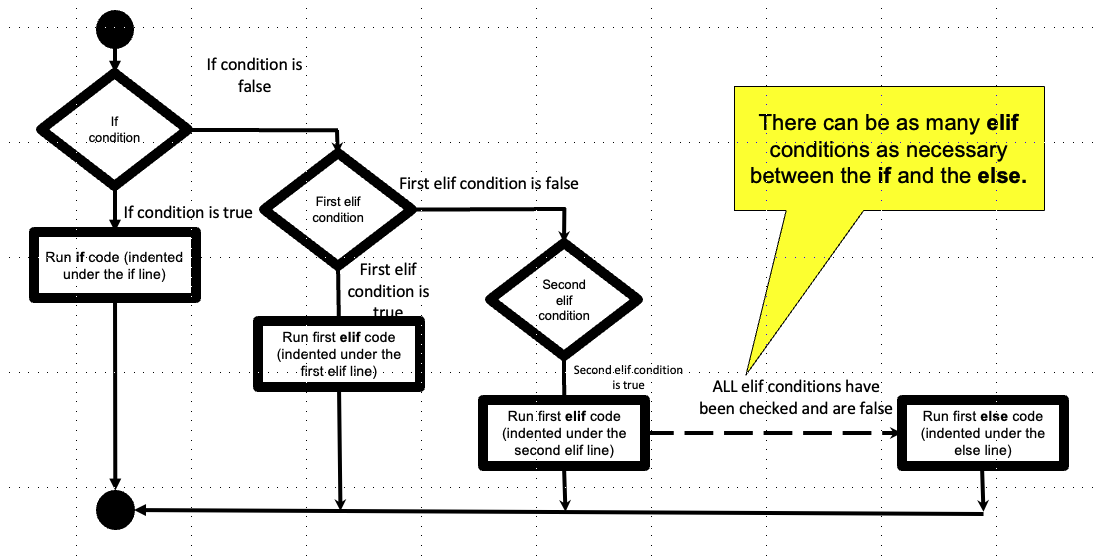
Some examples:
you have a fever if you’re above 100, hypothermia if you’re under 95; otherwise, you’re all good!
choosing an outfit depending on where you want to go (in the Spring in Maryland!).
choosing a football play depending on what you think the defense is showing.
Any other examples?
The key difference between this type of conditional block and the regular “if/else” blocks is that you need more than one Boolean expression; one for each if or elif statement.
Here’s a generic structure for chained conditionals (which you can use as a template when you’re writing new conditional blocks of this type):
1if someCondition:
2    # then something
3elif someOtherCondition:
4    # then something else
5else:
6    # some default (this is technically optional
7    # but if you leave it out, you may have some unexpected edge cases you didn't account for!
 1gpa = 3.5
 2gpa_threshold = 2.0
 3required_courses = 8
 4req_threshold = 10
 5
 6if gpa >= gpa_threshold and required_courses >= req_threshold:
 7    print("graduate!")
 8elif gpa >= gpa_threshold and required_courses < req_threshold:
 9    print("take more required courses")
10elif gpa < gpa_threshold and required_courses >= req_threshold:
11    print("take an easy course!")
12else:
13    print("talk to an advisor")
take more required courses
1# example
2temp_f = 97
3if temp_f >= 100:
4    print("fever!")
5elif temp_f < 95: # need another Boolean expression
6    print("hypothermia!")
7else:
8    print("all good!")
all good!
Keywords/phrases that signal that this is appropriate?
When you see more than two mutually exclusive conditions or choices
Practice! Let’s translate these English instructions into Python conditional blocks.
ticket pricing: if you’re under 5 or 65 and up, price is zero; if you’re theater staff, you get half price (7.50); otherwise pay normal price (15)
1# ticket pricing:
2# if you're under 5 or 65 and up, price is zero;
3# if you're theater staff, you get half price (7.50);
4# otherwise pay normal price (15)
5age = 65
6theater_staff = True
7# chained conditional block below here
Example solution
1if age < 5 or age >= 65:
2    price = 0
3elif theater_staff:
4    price = 7.50
5else:
6    price = 15
7
8print(price)
With age = 65 and theater_staff = True, the first condition is True (65 is “65 and up”), so this prints 0. Python never checks the staff condition at all.
This person qualifies for two branches, and whichever one you check first wins. So the ordering is a decision you’re making whether you realize it or not. The decision table section below covers how to make it deliberately.
help me write the grader for late assignments: if you submit before target date, you get full credit; if you submit after the target date, but before the last day of the period, you get 85% credit - if you submit on the last day of period, you get 70% credit
 1# help me write the updated grader for your PCEs:
 2# if you submit before target date, you get full credit;
 3# if you submit after the target date, but before or equal 1 week threshold, you get 85% credit
 4# if you submit after 1 week threshold, but before or equal to 2 week threshold, you get 70% credit
 5# otherwise, you get no credit
 6
 7submission_date = 35
 8target_date = 36
 9one_week_threshold = target_date + 7
10two_week_threshold = target_date + 14
11score = 1
12
13# chained conditional block below here
Example solution
 1if submission_date <= target_date:
 2    score = 1
 3elif submission_date <= one_week_threshold:
 4    score = 0.85
 5elif submission_date <= two_week_threshold:
 6    score = 0.70
 7else:
 8    score = 0
 9
10print(score)
With submission_date = 35 and target_date = 36, the first condition is True, so this prints 1 (full credit).
The conditions go in order from earliest to latest. Each elif already means “and it wasn’t earlier than that,” so you don’t need to write submission_date > target_date and submission_date <= one_week_threshold. The chain handles the lower bound for you.
Watch the boundary days. The English says “before the target date” and “after the target date,” so it never says what happens on the target date. Using <= in the first condition gives full credit for submitting on the due date, but you have to make that call yourself.
More practice: chained conditionals#
Try these on your own! Each one needs an if/elif/else block.
1. Letter grade converter#
If the score is 90 or above, print “A”. If 80-89, print “B”. If 70-79, print “C”. If 60-69, print “D”. Otherwise, print “F”.
1score = 85
2# chained conditional block below here
Example solution
 1if score >= 90:
 2    print("A")
 3elif score >= 80:
 4    print("B")
 5elif score >= 70:
 6    print("C")
 7elif score >= 60:
 8    print("D")
 9else:
10    print("F")
With score = 85, this prints B: the A check fails, the B check passes, and Python stops there.
The order matters here. Going the other direction (checking score >= 60 first) would hand out a D to everyone who passed; that’s the broken example discussed below.
2. Shipping cost calculator#
If the order weighs less than 1 lb, shipping is \(3. If it weighs 1-5 lbs, shipping is \)7. If it weighs more than 5 lbs, shipping is $12. Print the shipping cost.
1weight = 3.5
2# chained conditional block below here
Example solution
1if weight < 1:
2    print(3)
3elif weight <= 5:
4    print(7)
5else:
6    print(12)
With weight = 3.5, this prints 7. Because the first condition already ruled out everything under 1 lb, the second branch only needs to check the upper bound of the 1–5 lb range.
3. Time of day greeting#
Using 24-hour time (0 = midnight, 13 = 1pm, etc.): if the hour is less than 12, print “Good morning!” If 12-16, print “Good afternoon!” If 17-20, print “Good evening!” Otherwise, print “Good night!”
1hour = 14
2# chained conditional block below here
Example solution
1if hour < 12:
2    print("Good morning!")
3elif hour <= 16:
4    print("Good afternoon!")
5elif hour <= 20:
6    print("Good evening!")
7else:
8    print("Good night!")
With hour = 14, this prints Good afternoon!
4. Water state#
If the temperature (Celsius) is 0 or below, print “Solid (ice)”. If above 100, print “Gas (steam)”. Otherwise, print “Liquid (water)”.
1temp_c = 105
2# chained conditional block below here
Example solution
1if temp_c <= 0:
2    print("Solid (ice)")
3elif temp_c > 100:
4    print("Gas (steam)")
5else:
6    print("Liquid (water)")
With temp_c = 105, this prints Gas (steam).
The else covers the whole range from just above 0 up to 100. You don’t have to spell that range out, because reaching the else already means both earlier conditions were False.
5. BMI category calculator#
If BMI is below 18.5, print “Underweight”. If 18.5 to 24.9, print “Normal weight”. If 25.0 to 29.9, print “Overweight”. If 30.0 or above, print “Obese”.
1bmi = 22.5
2# chained conditional block below here
Example solution
1if bmi < 18.5:
2    print("Underweight")
3elif bmi < 25.0:
4    print("Normal weight")
5elif bmi < 30.0:
6    print("Overweight")
7else:
8    print("Obese")
With bmi = 22.5, this prints Normal weight.
The category boundaries in the problem are written as “18.5 to 24.9” and “25.0 to 29.9,” which leaves a gap: what about a BMI of 24.95? Writing the conditions as < 25.0 and < 30.0 closes those gaps, so every possible value lands in exactly one category.
Planning your conditionals with decision tables#
As your conditional blocks get more complex (especially with chained conditionals), it gets harder to keep track of all the possible situations your code needs to handle. A decision table is a simple but powerful planning tool: you list out all the possible combinations of your conditions, and then decide what should happen in each case. Think of it as a spreadsheet for your logic.
Why bother?#
Consider the ticket pricing example above. The English description says:
under 5 or 65 and up → free
theater staff → half price
otherwise → full price
But what if someone is 3 years old and theater staff? Should they get free or half price? The English description doesn’t tell us! A decision table forces you to confront these situations before you write code.
How to build a decision table#
Step 1: Identify your conditions (the things you’re checking). For ticket pricing, that’s: (a) is the person under 5 or 65+? and (b) are they theater staff?
Step 2: List every combination of True/False for those conditions. With 2 conditions, you get 4 rows:
under 5 or 65+ |
theater staff |
price |
|---|---|---|
True |
True |
??? |
True |
False |
$0 |
False |
True |
$7.50 |
False |
False |
$15 |
Step 3: Fill in what should happen for each row. That ??? is exactly the kind of edge case that causes bugs! You need to make a decision: let’s say young kids and seniors always get in free, even if they’re also staff. Now the table becomes:
under 5 or 65+ |
theater staff |
price |
|---|---|---|
True |
True |
$0 |
True |
False |
$0 |
False |
True |
$7.50 |
False |
False |
$15 |
Step 4: Now your conditional block almost writes itself. Looking at the table, you can see that the age condition should be checked first, since it applies regardless of staff status:
 1age = 3
 2theater_staff = True
 3
 4if age < 5 or age >= 65:
 5    price = 0
 6elif theater_staff:
 7    price = 7.50
 8else:
 9    price = 15
10
11print(f"Price: ${price}")
Price: $0
The importance of ordering conditions in chained conditionals#
Notice how the order of the if/elif matters in our theater example! If we checked theater_staff first, we’d accidentally charge a 3-year-old staff member $7.50. This is because chained conditional branches are mutually exclusive: Python only goes down the first branch where the condition is True: the order of your conditions thus represents an implicit logic: each elif really means “if none of the above were true AND this is true.”
So, two heuristics for ordering your conditions:
Specific to general (put the most restrictive conditions first)
Example:
1grade = 95
2
3# BROKEN — everyone with grade >= 70 gets "C"
4if grade >= 70:
5    print("C")
6elif grade >= 80:
7    print("B")
8elif grade >= 90:
9    print("A")
C
A student with a 95 gets “C” because 95 >= 70 is True and Python stops there.
Special/edge cases first
Related to the above, you want conditions that specific special/edge cases to go first. This is the ticket pricing thing above: if you’re below/above a certain edge, you’re a special case (i.e., free!!).
Another example:
 1numerator = 7
 2denominator = 0
 3
 4# Good: handle the special case before the general rule
 5if denominator == 0:
 6    print("Can't divide by zero!")
 7elif numerator / denominator > 1:
 8    print("Greater than 1")
 9else:
10    print("1 or less")
Can't divide by zero!
If you swap these, you crash on division by zero before you ever get to check for it.
Building out a decision table can help identify these specific/special edge cases, as we saw with the ticket pricing example.
Practice: build a decision table#
Try building a decision table for the late assignment grader exercise above. What are the conditions? How many rows do you need? Are there any edge cases where it’s not obvious what should happen?
Example solution
The conditions here aren’t independent True/False switches like the ticket example. They’re ranges on a single variable (submission_date), so instead of one row per True/False combination, you get one row per range:
submission date |
credit |
|---|---|
before |
100% |
after |
85% |
after |
70% |
after |
0% |
That’s four rows and four branches, one for each part of the if/elif/elif/else block above.
The edge cases are the boundary days. The English says “before the target date” and “after the target date,” but never says what happens on the target date, and the same question comes up at each threshold. Laying the ranges out in a table surfaces both gaps:
Submitting on
target_date: full credit, or 85%? (Full credit, if you read submitting on the due date as on time.)Submitting on
one_week_threshold: 85% or 70%? (85%, matching “before or equal 1 week threshold.”)
Neither answer is more correct than the other, but you have to pick one. If you skip this step the choice still gets made, just accidentally, by whichever comparison operator you happened to type.
More practice: chained conditionals with multiple variables#
The previous problems mostly involved checking one variable against different thresholds. These problems require you to consider two or more variables together to decide what to do. Try building a decision table first to help you think through the cases!
6. Study advice#
Give a student study advice based on their grade AND how many hours they study per week. If their grade is below 70 and they study less than 10 hours, print “You need to study more!”. If their grade is below 70 but they study 10 or more hours, print “Let’s review your study strategies.” If their grade is 70 or above and they study less than 5 hours, print “You’re doing well, but don’t get complacent!” Otherwise, print “Keep up the good work!”
1grade = 65
2study_hours = 12
3# chained conditional block below here
Example solution
1if grade < 70 and study_hours < 10:
2    print("You need to study more!")
3elif grade < 70:
4    print("Let's review your study strategies.")
5elif study_hours < 5:
6    print("You're doing well, but don't get complacent!")
7else:
8    print("Keep up the good work!")
With grade = 65 and study_hours = 12, the first condition fails (they are studying enough hours) and the second one passes, so this prints Let's review your study strategies.
The decision table has four rows here, one per combination:
grade < 70 |
hours below threshold |
message |
|---|---|---|
True |
True (< 10) |
study more |
True |
False |
review strategies |
False |
True (< 5) |
don’t get complacent |
False |
False |
keep up the good work |
Writing every condition out in full (elif grade < 70 and study_hours >= 10:) also works, and is probably clearer while you’re learning. The shorter version leans on the fact that reaching an elif already tells you the earlier conditions were False.
7. Parking fee calculator#
A parking garage charges based on the type of vehicle AND how long you park. For motorcycles: \(2 if 2 hours or less, \)5 if more than 2 hours. For cars: \(5 if 2 hours or less, \)12 if more than 2 hours. For trucks: \(10 if 2 hours or less, \)20 if more than 2 hours. Print the fee.
1vehicle = "car"
2hours_parked = 3
3# chained conditional block below here
Example solution
 1if vehicle == "motorcycle" and hours_parked <= 2:
 2    print(2)
 3elif vehicle == "motorcycle":
 4    print(5)
 5elif vehicle == "car" and hours_parked <= 2:
 6    print(5)
 7elif vehicle == "car":
 8    print(12)
 9elif vehicle == "truck" and hours_parked <= 2:
10    print(10)
11else:
12    print(20)
With vehicle = "car" and hours_parked = 3, the first three conditions fail and the fourth passes, so this prints 12.
Three vehicle types × 2 time ranges is six outcomes, so this chain gets long and repetitive. Keep it in mind when you get to nested conditionals below: asking “which vehicle?” first, and then asking “how long?” inside each vehicle’s path, says the same thing with a lot less repetition.
8. Movie recommendation#
Recommend a movie based on the viewer’s preferred genre AND their age. If they like “action” and are under 13, print “The Incredibles”. If they like “action” and are 13 or older, print “Mad Max”. If they like “comedy” and are under 13, print “Despicable Me”. If they like “comedy” and are 13 or older, print “The Grand Budapest Hotel”. For any other genre, print “Browse the catalog.”
1genre = "comedy"
2age = 10
3# chained conditional block below here
Example solution
 1if genre == "action" and age < 13:
 2    print("The Incredibles")
 3elif genre == "action":
 4    print("Mad Max")
 5elif genre == "comedy" and age < 13:
 6    print("Despicable Me")
 7elif genre == "comedy":
 8    print("The Grand Budapest Hotel")
 9else:
10    print("Browse the catalog.")
With genre = "comedy" and age = 10, this prints Despicable Me.
The final else matters here: it catches every genre you didn’t plan for ("horror", "documentary", a typo like "comdey"). Without it, those inputs would produce no output at all.
9. Shipping speed selector#
An online store offers shipping options based on the order total AND whether the customer is a member. If the total is at least \(50 and the customer is a member, print "Free 2-day shipping". If the total is at least \)50 and not a member, print “Free standard shipping”. If the total is less than \(50 and a member, print "\)3 standard shipping”. If the total is less than \(50 and not a member, print "\)7 standard shipping”.
1order_total = 35
2is_member = True
3# chained conditional block below here
Example solution
1if order_total >= 50 and is_member:
2    print("Free 2-day shipping")
3elif order_total >= 50:
4    print("Free standard shipping")
5elif is_member:
6    print("$3 standard shipping")
7else:
8    print("$7 standard shipping")
With order_total = 35 and is_member = True, the first two conditions fail and the third passes, so this prints $3 standard shipping.
This is a clean 2×2 decision table: two conditions, four combinations, four branches, and no ??? rows, because the problem statement spells out all four.
Nested conditionals#
Sometimes it only makes sense to check a condition if earlier conditions are true/false. This is like a garden of forking paths or choose your own adventure. Sometimes this to save time/operations. Other times, it may make your program more readable.
I like to think of it like a choose your own adventure maze:

Simple example: I want to know if x is the same, less than, or greater than y. We can represent this as a chained conditional with three conditions. But we can also group the less than or greater than conditional block by itself since that only make sense in the situation where x and y are not the same (i.e., x != y).
 1x = 5
 2y = 10
 3
 4if x == y:
 5    print("x and y are equal")
 6else:
 7    if x < y:
 8        print("x is less than y")
 9    else:
10        print("x is greater than y")
x is less than y
Another simple example: graduation requirements: if you’ve completed the base requirements and you have a 3.0 average, then we check: do you have sufficient electives? if yes, then great! if not, take more electives. if you don’t have the core requirements done, then you need to take care of that first, we’ll worry about electives later.
 1n_credits = 125
 2credit_threshold = 120
 3GPA = 3.5
 4n_electives = 3
 5electives_threshold = 4
 6
 7if n_credits >= credit_threshold and GPA >= 3.0:
 8    if n_electives >= electives_threshold:
 9        print("Ready to graduate!")
10    else:
11        print("Get more electives!")
12else:
13    print("Finish core requirements with sufficient GPA!")
Get more electives!
The key idea behind nested conditionals is that some questions only make sense to ask after you’ve answered an earlier question. Think of it like a flowchart or a phone tree or a “choose your own adventure” game: the first question determines which path you’re on, and then you face different follow-up questions depending on that path. This is different from chained conditionals, where all the conditions are testing for mutually exclusive possible answers for the same question (e.g., “what range is the score in?”).
A good test: if you enumerate the questions that are part of your problem, and one question would be meaningless or irrelevant without knowing the answer to a another question (i.e., is dependent on a previous question), that’s a signal to use nesting.
Practice! Let’s translate these English instructions into Python nested conditional blocks.
Polling booth: if you don’t have an id, go away and register, then come back; if you have an id come on in! then, if you need assistance, go to the assisted booth; otherwise, go to the normal booth.
1# polling booth: if your registration doesn't match this location, go away to the right place; if yes, then come on in!
2# then, if you need assistance, go to the assisted booth; otherwise, go to the normal booth.
3registration_here = True
4need_assistance = False
5
6# nested conditional block below here
Example solution
1if registration_here:
2    print("Come on in!")
3    if need_assistance:
4        print("Go to the assisted booth")
5    else:
6        print("Go to the normal booth")
7else:
8    print("Go to your correct polling location")
With registration_here = True and need_assistance = False, this prints Come on in! and then Go to the normal booth.
The assistance question is nested rather than chained because there’s no point asking which booth to send someone to until you know they’re in the right building. Watch the indentation: the inner if/else sits one level in, because it’s part of the outer True branch.
More practice: nested conditionals#
Try these on your own! Each one involves a condition that only makes sense to check after an earlier condition.
1. Online store checkout#
If the user is logged in, check if they have items in their cart: if yes, print “Proceeding to checkout”; if no, print “Your cart is empty”. If the user is not logged in, print “Please log in first”.
1logged_in = True
2items_in_cart = 0
3# nested conditional block below here
Example solution
1if logged_in:
2    if items_in_cart > 0:
3        print("Proceeding to checkout")
4    else:
5        print("Your cart is empty")
6else:
7    print("Please log in first")
With logged_in = True and items_in_cart = 0, this prints Your cart is empty.
items_in_cart is a count, not a Boolean, so the inner condition compares it to 0.
2. Amusement park ride#
If the rider is tall enough (at least 48 inches), then check their age: if they are under 12, print “You need an adult with you”; otherwise, print “Enjoy the ride!” If they are not tall enough, print “Sorry, you’re too short for this ride”.
1height = 50
2age = 10
3# nested conditional block below here
Example solution
1if height >= 48:
2    if age < 12:
3        print("You need an adult with you")
4    else:
5        print("Enjoy the ride!")
6else:
7    print("Sorry, you're too short for this ride")
With height = 50 and age = 10, this prints You need an adult with you.
3. Restaurant order#
If the restaurant is open, check if the item is on the menu. If yes, check if the item is in stock: if yes, print “Order placed!”; if no, print “Sorry, that item is sold out”. If the item is not on the menu, print “We don’t serve that here”. If the restaurant is closed, print “Sorry, we’re closed”.
1is_open = True
2on_menu = True
3in_stock = False
4# nested conditional block below here
Example solution
 1if is_open:
 2    if on_menu:
 3        if in_stock:
 4            print("Order placed!")
 5        else:
 6            print("Sorry, that item is sold out")
 7    else:
 8        print("We don't serve that here")
 9else:
10    print("Sorry, we're closed")
With is_open = True, on_menu = True, and in_stock = False, this prints Sorry, that item is sold out.
Three levels of nesting, because each question only makes sense once the previous one is answered: you can’t be out of an item you don’t even serve, and you can’t order anything from a closed restaurant.
4. Email filter#
If the email is from a known contact, print “Inbox”. If the email is not from a known contact: if it contains the word “unsubscribe”, print “Promotions”; otherwise, print “Unknown - review manually”.
1from_known_contact = False
2contains_unsubscribe = True
3# nested conditional block below here
Example solution
1if from_known_contact:
2    print("Inbox")
3else:
4    if contains_unsubscribe:
5        print("Promotions")
6    else:
7        print("Unknown - review manually")
With from_known_contact = False and contains_unsubscribe = True, this prints Promotions.
Here the nesting lives in the else branch: the “unsubscribe” question only gets asked about mail from strangers.
5. Tech support troubleshooter#
A user calls tech support. First, ask: is the device turning on? If it’s not turning on, check if it’s plugged in: if it’s not plugged in, print “Plug in the device and try again”; if it is plugged in, print “The device may be broken - schedule a repair”. If the device IS turning on, then check: is the screen displaying anything? If yes, print “Try restarting the application”; if no, print “The display may need replacement”.
Notice how the “is it plugged in?” question only makes sense if the device isn’t turning on, and the “is the screen displaying?” question only makes sense if it IS turning on. These are different follow-up questions depending on the first answer.
1device_turns_on = False
2is_plugged_in = False
3screen_displays = True
4# nested conditional block below here
Example solution
 1if device_turns_on:
 2    if screen_displays:
 3        print("Try restarting the application")
 4    else:
 5        print("The display may need replacement")
 6else:
 7    if is_plugged_in:
 8        print("The device may be broken - schedule a repair")
 9    else:
10        print("Plug in the device and try again")
With device_turns_on = False and is_plugged_in = False, this prints Plug in the device and try again. screen_displays is True in this data, but that value never gets looked at, because we never go down that path.
Both branches of the outer if contain a nested question, and the two questions are different. Nesting handles that; a chain wouldn’t.
6. Financial aid advisor#
First check: does the student have financial need (family income below $50,000)? If yes, check their GPA: if GPA is 3.5 or above, print “Eligible for full scholarship”; if GPA is below 3.5, print “Eligible for need-based grant”. If the student does NOT have financial need, we do a different check for their GPA: if GPA is 3.8 or above, print “Eligible for merit scholarship”; otherwise, print “No financial aid available”.
Notice: the GPA thresholds are different depending on whether the student has financial need. This is why nesting makes sense here – it’s not just “check income, then check GPA” independently. The meaning of the GPA check changes based on the income answer.
1family_income = 45000
2gpa = 3.6
3# nested conditional block below here
Example solution
 1if family_income < 50000:
 2    if gpa >= 3.5:
 3        print("Eligible for full scholarship")
 4    else:
 5        print("Eligible for need-based grant")
 6else:
 7    if gpa >= 3.8:
 8        print("Eligible for merit scholarship")
 9    else:
10        print("No financial aid available")
With family_income = 45000 and gpa = 3.6, this prints Eligible for full scholarship. The same GPA of 3.6 would print No financial aid available if the family income were $60,000: it clears the 3.5 bar on the need path, but not the 3.8 bar on the merit path.
Both paths ask about GPA, but against different thresholds (3.5 vs. 3.8) and with different outcomes. You can’t collapse this into “check income, then check GPA,” because the income answer changes what the GPA question means.
7. Package delivery router#
First, check if the package is domestic or international. If domestic, check the size: if it’s “small”, print “Send via regular mail”; if it’s “large”, print “Send via ground shipping”. If international, check if the destination country requires customs forms: if yes, print “Fill out customs form, then send via international courier”; if no, print “Send via international courier”.
Again notice: the follow-up question for domestic packages (what size?) is completely different from the follow-up question for international packages (customs forms needed?). These are different paths with different decision points.
1is_domestic = False
2package_size = "small"
3needs_customs = True
4# nested conditional block below here
Example solution
 1if is_domestic:
 2    if package_size == "small":
 3        print("Send via regular mail")
 4    else:
 5        print("Send via ground shipping")
 6else:
 7    if needs_customs:
 8        print("Fill out customs form, then send via international courier")
 9    else:
10        print("Send via international courier")
With is_domestic = False and needs_customs = True, this prints Fill out customs form, then send via international courier. As in the tech support problem, package_size is set in the data but never consulted, because we went down the international path.
8. Customer complaint handler#
First, check if the customer has a valid receipt. If they do, check what they want: if they want a “refund”, print “Process refund to original payment method”; if they want an “exchange”, print “Help customer find replacement item”. If they do NOT have a receipt, check if the purchase amount is under \(20: if yes, print "Offer store credit as a courtesy"; if no, print "Sorry, we need a receipt for returns over \)20”.
Notice how having a receipt vs. not leads to entirely different sets of options. With a receipt, we ask “refund or exchange?” Without one, we check the dollar amount instead – a completely different question.
1has_receipt = False
2wants = "refund"
3purchase_amount = 15
4# nested conditional block below here
Example solution
 1if has_receipt:
 2    if wants == "refund":
 3        print("Process refund to original payment method")
 4    else:
 5        print("Help customer find replacement item")
 6else:
 7    if purchase_amount < 20:
 8        print("Offer store credit as a courtesy")
 9    else:
10        print("Sorry, we need a receipt for returns over $20")
With has_receipt = False and purchase_amount = 15, this prints Offer store credit as a courtesy. The wants variable is never checked, since that question only comes up when there’s a receipt.
Common errors#
Syntax and indentation errors#
e.g., forgetting the colon, or forgetting to indent
Best recommendation is to use templates for now as you set them up. And of course, a linter in your editor of choice (e.g., Ruff for VSCode)!
Boolean expression errors#
Most commonly, using = (this is assigning!) instead of == (the Boolean operator you actually want)!
Semantic errors: leaving out conditions, wrong ordering of conditions#
Not covering all your bases or mapping the wrong conditions to outcomes. These are the trickiest because your code runs without errors, but it does the wrong thing!
Common examples:
Checking conditions in the wrong order (e.g., a more general condition “catches” cases before a more specific one gets a chance - see discussion above on ordering of chained conditionals)
Forgetting an edge case (e.g., what if two conditions are both true at the same time?)
Using
andwhen you meanor, or vice versa
Especially for chained conditionals, build a decision table before you write your conditional block (see the decision tables section above) can be a great way to prevent these kinds of errors. Listing out every combination of conditions and deciding what should happen in each case helps you spot gaps and conflicts in your logic before they become bugs.
Example decision table for Project 1: https://docs.google.com/spreadsheets/d/1-q5XXbMDoji8AMVWxgUf5GW5CUOJfiWQTTV6u0-DwF8/edit?usp=sharing
You can also use decision tables to debug existing code: build the table from your code by tracing through each row, and compare it to what you intended. If they don’t match, you’ve found your bug.
Using separate if blocks instead of elif#
A very common mistake is writing multiple separate if statements when you actually need a chained conditional (if/elif/else). These look similar but behave very differently!
Consider this example: assign a letter grade based on a score.
Wrong (separate if blocks):
 1score = 85
 2
 3if score >= 90:
 4    grade = "A"
 5if score >= 80:
 6    grade = "B"
 7if score >= 70:
 8    grade = "C"
 9if score >= 60:
10    grade = "D"
11else:
12    grade = "F"
13
14print(grade)
D
This prints "D"! Why? Because each if is a separate conditional block — they all run independently. So even though score >= 90 is False, the program keeps going and checks every other if. When it gets to score >= 80, that’s True, so grade becomes "B". But then it keeps checking: score >= 70 is also True, so grade gets overwritten to "C". Then score >= 60 is also True, so grade gets overwritten again to "D".
Right (chained conditional with elif):
 1score = 85
 2
 3if score >= 90:
 4    grade = "A"
 5elif score >= 80:
 6    grade = "B"
 7elif score >= 70:
 8    grade = "C"
 9elif score >= 60:
10    grade = "D"
11else:
12    grade = "F"
13
14print(grade)
B
This correctly prints "B". With elif, once a condition is True and its branch runs, the rest of the chain is skipped. That’s the whole point of chaining: the conditions are mutually exclusive — only one branch ever executes.
Remember that chained conditionals are really for situations where your conditions (questions) are meant to be mutually exclusive (only one should “win”), so we use elif to chain them together, which means the code can only go down a single branch depending on the answer to the mutually exclusive questions. Use separate if blocks only when the conditions are truly independent and you want each one checked regardless of the others.