5: Lists#
Learning goals#
Create a list in Python
Do common operations on lists (e.g., appending, indexing, slicing, sorting)
Explain difference between mutable and immutable data structures
Recognize potential application opportunities for collection methods and functions (e.g., len, max, min)
Explain difference between functions and methods
Appropriately apply collection methods and functions to lists
What are lists and why should we care about them?#
A list is a kind of collection data structure#
So far we’ve mostly used a “non-collection” data structures. Most of our variables have one value in them - when we put a new value in the variable, the old value is overwritten
A list is a kind of collection data structure. A collection allows us to put many values into a single “variable”
A collection is nice because we can carry many values around in one convenient package
1a_list = []
2s = ""
3friends = ['Joseph', 'Glenn', 'Sally']
4carryon = ['socks', 'shirt', 'perfume']
5scores = [1, 50, 32]
1friends
['Joseph', 'Glenn', 'Sally']
Why do we need more data structures than strings, numbers and Boolean values?#
Recall that computational thinking is a key component of programming skill. Algorithms — sets of rules or steps used to solve a problem — are an important way to model and instruct computers to solve problems. In computer science, it is well known that some algorithms need special data structures — particular ways of organizing data in a computer.
Consider this problem: Find the smallest number amongst a set of N numbers.
Can you think of a structured set of rules (algorithms) for solving this problem in a reusable way without using a collection / list?
 1# find the smallest number amongst five numbers
 2a = 1
 3b = 5
 4c = 7
 5d = 10
 6e = 2
 7
 8def find_smallest_among_5(a, b, c, d, e):
 9    smallest = a
10    if b < smallest:
11        smallest = b
12    if c < smallest:
13        smallest = c
14    if d < smallest:
15        smallest = d
16    if e < smallest:
17        smallest = e
18    return smallest
Notice that these are separate if statements instead of a chained conditional (if/elif). That’s on purpose: we need to compare EACH number against the smallest so far. With elif, Python would stop checking as soon as it found one number smaller than a. For example, with a=10, b=5, c=1, it would update smallest to 5 and never look at c, so it would return the wrong answer.
What if we have six numbers? We can’t reuse our function. We need to modify it to add another parameter and another if statement.
 1def find_smallest_among_6(a, b, c, d, e, f):
 2    smallest = a
 3    if b < smallest:
 4        smallest = b
 5    if c < smallest:
 6        smallest = c
 7    if d < smallest:
 8        smallest = d
 9    if e < smallest:
10        smallest = e
11    if f < smallest:
12        smallest = f
13    return smallest
What if we have three numbers? Again, we can’t reuse our function. We need to modify it to remove parameters and if statements.
1# or just 3?
2def find_smallest_among_3(a, b, c):
3    smallest = a
4    if b < smallest:
5        smallest = b
6    if c < smallest:
7        smallest = c
8    return smallest
In contrast, check out what we can do if we have lists as a data structure! This is an elegant function that covers the class of “find smallest among N numbers” problems and can be reused and composed.
1# with lists
2def find_smallest(l):
3    # sort the list
4    l.sort()
5    # get the first item
6    return l[0]
1l = [4, 5, 7, 10, 2, 10, 15]
2find_smallest(l)
2
Again, as you can see, we could in principle solve each variant of the “find smallest” problem with separate variables for each item. But it’s very clunky! And error prone! And basically impossible to generalize (contra core goal of developing abstractions over classes of problems, from CompT).
The point to note here is that your ability to model (and therefore solve) problems with programming is dependent on your knowledge of data structures (since they constrain the set of algorithms you can recognize and apply to problems). So as you expand your knowledge of data structures, try to note down also the common situations in which they apply, and what algorithms they tend to “work well with”.
You will learn a few more data structures this semester (dive more into strings this module, then files and dictionaries next module, and dataframes for data analysis in the final module). And of course many more as you advance in your career.
Here are lists in context of our example problem from last week:
 1# key variables:
 2# the input LIST of strings
 3inputs = [
 4    "hello sarah@umd.edu",
 5    "from: joelchan@umd.edu",
 6    "some other text that doesn't have an email"
 7]
 8# a LIST to store the email addresses
 9emails = []
10
11# Loop over every text input
12for text_input in inputs:
13
14    # extract an email address
15    # split the text into subsets
16    chunks = text_input.split()
17
18    # check every chunk
19    for chunk in chunks:
20        # check if it has @ and .
21        if "@" in chunk and "." in chunk:
22            # put the chunk in the email list
23            emails.append(chunk)
24# give the email address back to the user
25print(emails)
['sarah@umd.edu', 'joelchan@umd.edu']
How would you solve this without lists? Or some kind of collection?
Anatomy of a list in Python#
List constants or “literals”:
Are surrounded by square brackets
Contain zero or more elements; multiple items are separated by commas.
 1"1, 2, 3" # string
 21 # int
 31.0 # float
 4
 5basic_list = [1, 2, 3] # list
 6another_list = [11,32,53] # the spaces don't matter for Python, only the commas; spaces are for readability for us
 7another_list = [
 8    "a really long item in the list",
 9    2,
10    3
11]
12matrix = [
13    [0, 1, 2],
14    [0, 0, 1],
15    [0, 1, 0]
16]
17
18# can also show up like this if you want to see the contents more explicitly
19# python knows where the list starts or stops based on the brackets
20basic_list_2 = [
21    1,
22    2,
23    3
24]
25
26# handy for large items in a list
27sentences = [
28    "something",
29    "she sells sea shells by the sea here",
30    "she sells sea shells by the sea there",
31]
32#sentences = ["she sells sea shells by the sea shore", "she sells sea shells by the sea here", "she sells sea shells by the sea there"]
1sentences
['something',
 'she sells sea shells by the sea here',
 'she sells sea shells by the sea there']
1basic_list
[1, 2, 3]
You can assign lists to variables, just like other values, with a variable assignment statement.
1a = [1, 2, 3]
2b = [1, "2", 3.0]
3c = [a, b] # list of lists
4print(a)
5print(b)
6print(c)
7d = {"a": 1}
8e = [d, a]
9e
[1, 2, 3]
[1, '2', 3.0]
[[1, 2, 3], [1, '2', 3.0]]
[{'a': 1}, [1, 2, 3]]
Some properties of lists#
The first key property of a list that maybe doesn’t need to be mentioned is that it can hold more than one value (this is the point of a list data structure!). Although you would usually have multiple items in a list, you can also have lists with just one item, or no items (when you’re starting out a list that will later hold some stuff)!
But here are some other important properties that may not be obvious.
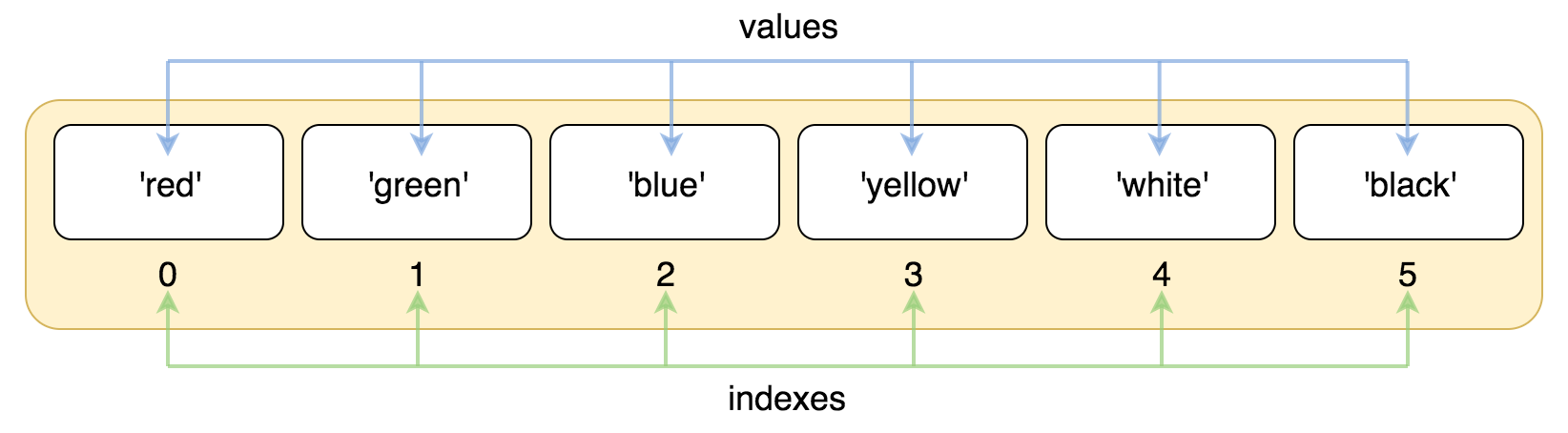
Lists are indexed positionally#
Lists are indexed positionally, and therefore have an inherent notion of position / order. Some other data structures, like dictionaries, don’t have this property.
This allows you to do things like sort, find by position (e.g., “first” or “last”)
NOTE: the index starts at 0, not 1! So the first item is at index / position 0, the second at index / position 1, and so on…
 1basic_list_3 = [
 2  "red", # psn 0
 3  "green", # psn 1
 4  "blue", # psn 2
 5  "yellow", # psn 3
 6  "white", # psn 4
 7    "black", # psn 5
 8]
 9
10# get the first item
11basic_list_3[0]
12
13# get the sixth item
14basic_list_3[5]
'black'
Here it is in pictures.
You can also index in reverse! Handy for getting the last item in a list.
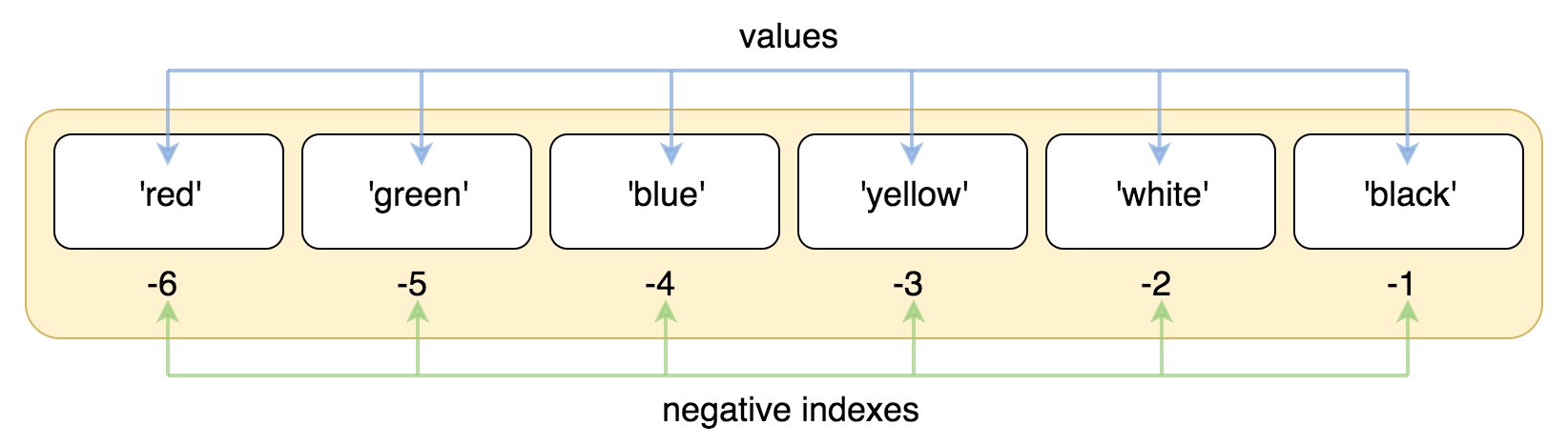
Yes, the alert reader will notice that this reverse indexing starts at… 1. So why does the indexing start at 0? I’m afraid I don’t have a good answer. Maybe it came from the design of the C programming language, and most languages (but not all!! R starts indexing at 1), followed suit.
1print(basic_list_3[-1]) # gets you the last item, at position -1
2print(basic_list_3[-2]) # gets you the 2nd last item, at position -2
black
white
This is very important to remember this as you work with getting things in and out of lists
Lists can hold items of mixed type#
What can go in a list? Any Python object: even another list!
Importantly, the items don’t all have to be the same type: you can have a list that mixes strings, ints, other lists, and so on.
For example:
1basic_list = [1, 2, 3] # list
2x = [1, "1", basic_list] # mixed
3y = [basic_list, basic_list, basic_list] # list of lists
4empty_list = [] # empty list, often used for initialization
5list_w_one = [1]
6print(x)
7print(y)
[1, '1', [1, 2, 3]]
[[1, 2, 3], [1, 2, 3], [1, 2, 3]]
1y
[[1, 2, 3], [1, 2, 3], [1, 2, 3]]
Lists are mutable#
Lists are mutable: you can change the list directly (e.g., removing items from the list, replacing, adding, etc.).
For example:
1basic_list_4 = [4, 6, 7, 10, 5]
2print(basic_list_4)
3basic_list_4[1] = 7 # can mutate the list (i.e., modify it directly)
4print(basic_list_4)
[4, 6, 7, 10, 5]
[4, 7, 7, 10, 5]
This may seem like an obvious property, but some other data structures (like strings!) are immutable - you can never directly modify the value held by the variable, you can only create a new modified value that you must then assign to the same or different variable to keep around. Hold this thought to compare/contrast when we discuss strings in a couple weeks.
Working with lists (basic operations)#
Make a list#
Can use the assignment statement to initialize to an empty list, or manually specify what’s in a list
1x = [1, 2, 3] # list with numbers 1 2 and 3
2y = [] # empty list
3z = [4, 7]
Can create from existing lists, using concatenation (adding two existing lists together)
1new_list = x + z
2new_list
[1, 2, 3, 4, 7]
1# another way that some people create lists
2some_list = list()
3some_list
[]
1int("3")
3
Get one thing out of a list: Indexing#
Lists are composed of a sequence of slots, each of which has an index. Indexing is a way to get something out of a list at a specific index position. In English, we might say, “get me the 1st item in the list”, or “get me the 3rd item in the list”. In Python, it’s a little bit different, since indices start at 0. So “the first item in the list” in Python would be “the item at index position 0 in the list”.
Here are some examples:
1some_list = [3, 4, 5]
2print(some_list[0]) # first item
3print(some_list[1]) # second item
4print(some_list[2]) # third item
3
4
5
A helpful trick for getting the last or nth-to-last item is to start the indexing in reverse. Confusingly, this indexing starts at 1… Sorry!
-1 is last
-2 is second last
and so on…
1another_list = [3, 4, 5, 6, 7] # 5 items in this list
2print(another_list[3]) # how to get the 4th item?
3print(another_list[-1]) # get the last item
4print(another_list[-2]) # get the 2nd-to-last item
6
7
6
This reverse indexing can be handy for getting smallest/largest after sorting a list, especially if there are lots of items in the list.
1a = [4, 6, 1, 8, 20, 13]
2a.sort()
3a[-1]
20
Let’s practice some more!
1# get the 3rd item
2x = [1, 2, 3]
3y = ["one", "two", "three"]
4print(x[2])
5print(y[2])
3
three
1# get the first item
2print(x[0])
3print(y[0])
1
one
Get multiple (contiguous) things out of a list: Slicing#
Slicing is a variation of indexing that grabs more than one value. The colon specifies that you’re slicing.
The first number is where you start. The second number is the upper limit, i.e., up to but not including.
 1x = [
 2  4, # 0
 3  6, # 1
 4  8, # 2
 5  1, # 3
 6  2, # 4
 7  5  # 5
 8]
 9# get the first two items
10# print(x[0:2])
11# # get the last two items
12# print(x[-2:])
13# # get the items from the 3rd position onwards (i want to ignore the first two)
14print(x[2:])
15# # get everything up to the 3rd position (i.e., index 2)
16# print(x[:3])
[8, 1, 2, 5]
Let’s practice some more!
1# get everything up to the 4th item
2x[:4]
[4, 6, 8, 1]
Modify values (“mutate”) in a list#
Use the index to specify which part of the list you want to modify, and assign it a (new) value
1x = [4,6,8,1,2,5]
2print(x)
3print("first item", x[0])
4# change the first item to 10
5x[0] = 10 # notice how this looks like an assignment statement
6print(x)
7print("new first item", x[0])
[4, 6, 8, 1, 2, 5]
first item 4
[10, 6, 8, 1, 2, 5]
new first item 10
 1x = [
 2  4, # 0
 3  6, # 1
 4  8, # 2
 5  1, # 3
 6  2, # 4
 7  5  # 5
 8]
 9# how do we modify this list so that the last item has the value 20?
10x[5] = 20
11# x[-1] = 20 # this is equivalent
12x
[4, 6, 8, 1, 2, 20]
Check what’s in a list#
Python provides the in operator that lets you check if an item is in a list.
It’s a logical operator that returns True or False, so you can use it as a logical / Boolean expression, for use with conditionals and so on. You’ll find this to be quite handy: we often want to be lazy and only do something if a list contains a thing we care about!
1names = ["joe", "harry", "rachel", "kelly"]
2"joel" not in names
3# if "joel" in names:
4#     print("Found!")
5# else:
6#     print("Not found!")
True
Practice: Indexing and Slicing#
Let’s practice indexing and slicing in a couple of ways. First, we’ll READ code and predict what it does (code tracing). Then we’ll flip it around and WRITE the code ourselves from an English description.
Part 1: Code tracing#
For each problem below, predict what the code will print before running the cell. Then run the cell to check your answer!
Trace 1#
1colors = ["red", "blue", "green", "yellow"]
2print(colors[1])
What does this print?
A)
redB)
blueC)
greenD) Error
Answer:
B) blue
Indexing starts at 0, so index 1 is the second item. If you picked A, you’re thinking of index 1 as the “first” item — remember, that’s index 0!
Trace 2#
1fruits = ["apple", "banana", "cherry", "date", "elderberry"]
2print(fruits[-1])
3print(fruits[-3])
What does this print?
A)
elderberryanddateB)
dateandcherryC)
elderberryandcherryD)
elderberryandbanana
Answer:
C) elderberry and cherry
Negative indexing starts from the end: -1 is the last item (elderberry), -3 is the third from the end (cherry). If you picked A, you may have counted -3 as third from the end starting at -1 (i.e., going -1, -2, -3 = cherry, date… but -3 lands on cherry, not date).
Trace 3#
1nums = [10, 20, 30, 40, 50]
2print(nums[0])
3print(nums[2])
4print(nums[4])
What does this print?
A)
10,20,30B)
10,30,50C)
20,40,50D)
20,40, and then an Error
Answer:
B) 10, 30, and 50
Index 0 is the first item (10), index 2 is the third (30), and index 4 is the fifth and last (50). If you picked C or D, you may be thinking indices start at 1.
Trace 4#
1animals = ["cat", "dog", "fish", "bird"]
2animals[2] = "hamster"
3print(animals)
What does this print?
A)
['cat', 'hamster', 'fish', 'bird']B)
['cat', 'dog', 'hamster', 'bird']C)
['cat', 'dog', 'fish', 'hamster']D)
['cat', 'dog', 'fish', 'bird', 'hamster']
Answer:
B) ['cat', 'dog', 'hamster', 'bird']
We replaced the item at index 2 ("fish") with "hamster". Lists are mutable! If you picked A, you’re thinking index 2 is "dog" (off by one). If you picked D, you may be confusing mutation with append().
Trace 5#
1scores = [88, 72, 95, 60, 84]
2scores[3] = 75
3print(scores)
4print(scores[1] + scores[3])
What does this print?
A)
[88, 72, 95, 75, 84]and147B)
[88, 72, 95, 60, 84]and132C)
[88, 72, 95, 75, 84]and167D)
[88, 72, 95, 75, 84]and155
Answer:
A) [88, 72, 95, 75, 84] and 147
We changed index 3 from 60 to 75. Then scores[1] + scores[3] is 72 + 75 = 147. If you picked B, you missed the mutation at index 3. If you picked C, you may be grabbing the wrong indices (e.g., thinking index 1 is 88).
Trace 6#
1vals = [10, 20, 30, 40, 50]
2print(vals[1:3])
3print(vals[:2])
4print(vals[3:])
What does this print?
A)
[20, 30],[10, 20],[40, 50]B)
[20, 30, 40],[10, 20],[40, 50]C)
[10, 20, 30],[10, 20],[30, 40, 50]D)
[20, 30],[10, 20, 30],[40, 50]
Answer:
A) [20, 30], [10, 20], [40, 50]
Slicing: [1:3] gives indices 1 and 2 (up to but not including 3). [:2] gives the first 2 items. [3:] gives everything from index 3 onward. If you picked B, remember the upper bound is exclusive!
Trace 7#
1letters = ["a", "b", "c", "d", "e", "f"]
2print(letters[-2:])
3print(letters[:-2])
4print(letters[1:-1])
What does this print?
A)
['e', 'f'],['a', 'b', 'c', 'd'],['b', 'c', 'd', 'e']B)
['e', 'f'],['c', 'd', 'e', 'f'],['b', 'c', 'd', 'e']C)
['e', 'f'],['a', 'b', 'c', 'd'],['b', 'c', 'd', 'e', 'f']D)
['f'],['a', 'b', 'c', 'd', 'e'],['b', 'c', 'd', 'e']
Answer:
A) ['e', 'f'], ['a', 'b', 'c', 'd'], ['b', 'c', 'd', 'e']
Negative numbers work in slices too, and they count from the end just like in indexing. [-2:] starts at the 2nd-to-last item and goes to the end. [:-2] goes from the start up to (but not including) the 2nd-to-last item, so it’s “everything except the last 2.” [1:-1] starts at index 1 and stops just before the last item, so it’s “everything except the first and last.” If you picked B, you probably read [:-2] as “drop the first 2”. But the missing number is the start, so it begins at the front. If you picked C, remember the stop is still exclusive when it’s negative.
Part 2: Writing indexing and slicing code#
Now let’s flip it around: instead of predicting what code does, WRITE the code that does what the English description says. For each problem, it helps to ask yourself:
Do I want one item (indexing) or several items in a row (slicing)?
Is it easier to count from the front (0, 1, 2, …) or from the back (-1, -2, …)?
If slicing: where do I start, and where do I stop? (Remember: the stop is not included, so it’s one past the last item you want.)
Write your code in the cell, run it to check that it gives you what you expect, then compare with the answer.
Write 1: First and last#
1tasks = ["email TA", "read chapter 5", "do practice problems", "submit project", "go to office hours"]
2# print the first task in the list
3
4# print the last task in the list
Answer:
1print(tasks[0])
2print(tasks[-1])
tasks[4] also works for the last item, but tasks[-1] gets the last item no matter how long the list is. That’s handy when you don’t know (or don’t want to count) how many items are in the list. A common mistake I see is tasks[5]: there are 5 items, but the last index is 4, so tasks[5] gives an IndexError.
Write 2: Translating “nth” into an index#
1# the race results, in order of who finished first
2finishers = ["Aisha", "Ben", "Carmen", "Dmitri", "Eun-ji", "Femi"]
3# print who came in 3rd place
4
5# print who came in 2nd-to-last place
Answer:
1print(finishers[2])
2print(finishers[-2])
“3rd place” is the 3rd item, which is index 2 (since indexing starts at 0). If you wrote finishers[3], you got Dmitri, who came in 4th. For 2nd-to-last, negative indexing does the counting for you: -1 is last, -2 is 2nd-to-last.
Write 3: Using list items in a calculation#
1# daily step counts, Monday through Sunday
2steps = [8200, 10450, 6300, 12000, 9100, 4000, 15500]
3# how many more steps did I take on Sunday than on Monday? print the answer
Answer:
1print(steps[-1] - steps[0])
This prints 7300. An item you get out of a list with indexing is just a value, so you can use it in an expression like any other number (or store it in a variable first, e.g., sunday = steps[-1]). steps[6] also works for Sunday.
Write 4: The first few items#
1# the leaderboard is already sorted from highest to lowest score
2leaderboard = ["Priya", "Marcus", "Lena", "Tomas", "Yuki", "Sam"]
3# get a list of the top 3 players and print it
Answer:
1top_three = leaderboard[:3]
2print(top_three)
This prints ['Priya', 'Marcus', 'Lena']. leaderboard[0:3] is the same thing (leaving out the start means “start from the beginning”). A common mistake is leaderboard[0:2], which only gets 2 players: the stop (2) is not included. Here’s a helpful trick: when you start from the beginning, the stop number is the same as how many items you get.
Write 5: The last few items#
1# monthly rent payments, from oldest to newest
2payments = [1200, 1200, 1250, 1250, 1250, 1300, 1300, 1325]
3# get a list of the 3 most recent payments and print it
Answer:
1recent = payments[-3:]
2print(recent)
This prints [1300, 1300, 1325]. Start at the 3rd-to-last item (-3) and leave out the stop to go all the way to the end. payments[5:] also works for this list, but [-3:] keeps working when next month’s payment gets added. There’s a couple of common mistakes here:
payments[-3:-1]leaves out the newest payment, because the stop is not included.payments[:-3]gets everything except the last 3 (the opposite of what we want).
Write 6: Skipping the header row#
1# rows from a spreadsheet; the first row has the column names, not data
2rows = ["name,major,year", "Ana,INST,2", "Raj,CS,3", "Mei,INST,4"]
3# get a list of just the data rows (everything except the header) and print it
Answer:
1data_rows = rows[1:]
2print(data_rows)
Start at index 1 (skipping index 0, the header) and go to the end. You’ll use this exact move a lot when we work with files!
Write 7: Something in the middle#
1week = ["Sun", "Mon", "Tue", "Wed", "Thu", "Fri", "Sat"]
2# get a list of just the weekdays (Monday through Friday) and print it
Answer:
1weekdays = week[1:6]
2print(weekdays)
"Mon" is at index 1 and "Fri" is at index 5. Since the stop is not included, the stop needs to be one past the last item we want: 5 + 1 = 6. If you wrote week[1:5], you lost Friday! week[1:-1] also works: “everything except the first and last.”
Write 8: Fixing an item#
1groceries = ["eggs", "milk", "bread", "buter", "apples"]
2# "butter" is misspelled! fix it in the list, then print the list
Answer:
1groceries[3] = "butter"
2print(groceries)
Use the index on the left side of an assignment statement to replace the item at that position. Watch out for these mistakes:
groceries[3] == "butter"uses==, which compares (and givesFalse). It doesn’t change anything.groceries = "butter"replaces the whole list with a single string.
Write 9: Updating an item based on its old value#
1# temperature readings, from oldest to newest
2temps = [71, 68, 74, 77, 80]
3# the sensor was off: the newest reading should be 2 degrees higher. update the list, then print it
Answer:
1temps[-1] = temps[-1] + 2
2print(temps)
This prints [71, 68, 74, 77, 82]. Just like x = x + 2 with a regular variable, Python first evaluates the right side (get the current last item, add 2), then stores the result back into the last slot.
Write 10: Checking inside a slice#
1waitlist = ["Jordan", "Kai", "Lupe", "Mo", "Nadia", "Omar"]
2# only the first 3 people on the waitlist get a spot in the class.
3# write a Boolean expression that checks whether "Mo" gets a spot
Answer:
1"Mo" in waitlist[:3]
This gives False. First, waitlist[:3] makes a new list with just the first 3 people. Then in checks whether "Mo" is in that list. If you wrote "Mo" in waitlist, you got True, because that checks the whole waitlist (including the people who don’t get a spot). Since this is a Boolean expression, you could use it as the condition in an if statement (e.g., to print “You’re in!”).
Write 11 (challenge): Swapping two items#
1lineup = ["Ava", "Ben", "Cleo", "Dan"]
2# swap the first and last people in the lineup, then print it
3# the result should be ['Dan', 'Ben', 'Cleo', 'Ava']
Answer:
1first = lineup[0]
2lineup[0] = lineup[-1]
3lineup[-1] = first
4print(lineup)
The tricky part: if you do lineup[0] = lineup[-1] first, "Ava" is overwritten and gone, so you’d get ['Dan', 'Ben', 'Cleo', 'Dan']. That’s why we save the first item in a variable before we overwrite it: so we can put it back at the end.
List methods and collection functions#
There are a great many other built-in operations in Python that let you do things with lists. They fall into list methods and also built in functions that take a list as an argument.
Collection functions#
Python has built in functions that operate on lists as arguments
len()math ones:
max(),min(),sum()sorted()look for the ones that have an “iterable” as as parameter type here: https://docs.python.org/3/library/functions.html
These are functions, so mechanics are just like functions - function name, pass in list as an input argument, plus whatever other arguments might be needed, and get back some output value
Let’s play with a few!
Get the length of a list with len()#
1x = [1, 2, 3, 1, 4, 1, 5, 10, 12, 11]
2x_length = len(x) # get the length of x
3print(x_length)
10
Get a sorted version of a list with sorted()#
Use sorted() to make a new list that is a sorted version of x. Do this if you want to keep the original list around.
1x_sorted = sorted(x)
2print(x_sorted)
[1, 1, 1, 2, 3, 4, 5, 10, 11, 12]
You can pass in optional keyword arguments that control how the list is sorted. The most common one is to set reverse to True (by default it is False, which means it’s sorted in ascending order).
1x_sorted_desc = sorted(x, reverse=True) # sort in descending order
2print(x_sorted_desc)
[12, 11, 10, 5, 4, 3, 2, 1, 1, 1]
Do math with lists using min(), max(), sum(), and more#
1print(min(x))
2print(max(x))
3print(sum(x)/len(x)) # average, using sum and len
1
12
5.0
NOTE: you can’t use any of these math-y functions with lists of “not-numbers”. For example, the following code will yield a TypeError:
1list_of_strings = [
2    "she",
3    "sells",
4    "seashells",
5    "by",
6    "the",
7    "seashore"
8]
9sum(list_of_strings)
List methods#
Python lists also have methods.
In Python, I like to think of methods as functions that only certain kinds of objects (e.g., list) can “do”.
We’ll see that many of the data structures in Python are like this, including strings in 2 weeks. And you can also create your own objects! You will learn much more about this in 326 - this is “object oriented programming”.
All of the list methods are listed (no pun intended!) here: https://docs.python.org/3/tutorial/datastructures.html
Here are some common examples:
 1a_list = [1, 2, 3, 1, 4, 1, 5]
 2print("original list:", a_list)
 3
 4# add something to the end of a list (WE'LL USE THIS A LOT)
 5a_list.append(4)
 6print("\n", a_list, "after appending 4")
 7
 8# sort the list (WE'LL ALSO USE THIS A LOT)
 9a_list.sort()
10print("\n", a_list, "after sorting")
11# control how you sort
12a_list.sort(reverse=True)
13print("\n", a_list, "after sorting in reverse order")
14
15# count how many times an item is in a list (handy for searching)
16print("\nnumber of occurences of 1 in the list:", a_list.count(1)) # how many times does the number 1 show up in this list?
17
18# where is 1 in the list?
19print("\n1 is at position", a_list.index(1), "in the list")
20
21# insert an item at a specific position
22a_list.insert(3, 22)
23print("\n", a_list, "after inserting 22 at position 3")
original list: [1, 2, 3, 1, 4, 1, 5]

 [1, 2, 3, 1, 4, 1, 5, 4] after appending 4

 [1, 1, 1, 2, 3, 4, 4, 5] after sorting

 [5, 4, 4, 3, 2, 1, 1, 1] after sorting in reverse order

number of occurences of 1 in the list: 3

1 is at position 5 in the list

 [5, 4, 4, 22, 3, 2, 1, 1, 1] after inserting 22 at position 3
Syntax for (list) methods#
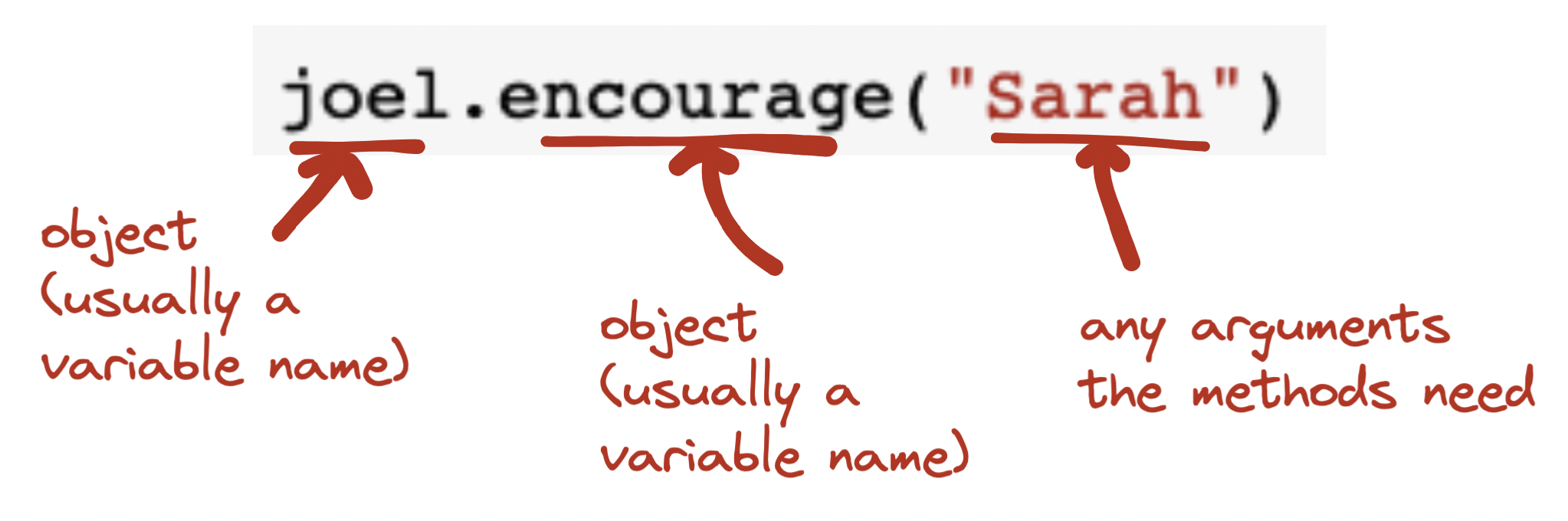
Stepping back for a second, here’s how it works, basically, syntax wise.
nameOfVariable.nameOfMethod(anyArgumentsTheMethodsNeed)
And in pictures:
Methods that change the list vs. methods that return a value#
NOTE: mutating list methods like .sort(), .append(), and .insert() change the list itself: they do not return a new value. Like your functions that lack return statements, their return value is None. (Other list methods like .count() and .index() DO return values without modifying the list.)
You can tell whether a method will produce a return value or not by whether the docs describe it doing a thing vs returning a thing. For example, in the Python docs for list methods, .count() is described as a method that will “Return the number of times value appears in the list,” while .sort() is described as a method that will “Sort the items of the list in place.” A few methods do both: .pop() will “Remove the item at the given position in the list, and return it.” So read the whole description!
1result = a_list.sort()
2print(result)
None
If you want to keep the original list instead of modifying it directly, you should use the collection functions (e.g., sorted() instead of list.sort()).
1a_list = [5,2,7,10,3]
2result = sorted(a_list)
3print(a_list)
4print(result)
[5, 2, 7, 10, 3]
[2, 3, 5, 7, 10]
Mapping methods/functions to situations#
Let’s practice! Keep these handy, and guess/propose situations where some of these methods/functions will be useful
 1# finding the smallest/biggest thing
 2x = [1, 2, 3, 7, 9, 11, 14]
 3
 4# find the smallest?
 5min(x) # yes, we didn't actually even need to write our `find_smallest()` function above!
 6
 7# find the biggest?
 8max(x)
 9
10# sort?
11x.sort()
12
13# filtering
14def is_odd(n):
15    return n % 2 != 0
16
17# apply the "is_odd" function to filter all the elements in x, so that we only get items that pass the "is_odd" test
18list(filter(is_odd, x))
[1, 3, 7, 9, 11]
Meta-points here
Get in the habit of suspecting that something you want to do probably already has a function/method written for it that you can use (that probably does it well)
Notice the docstrings!
Try a couple more!
Remove “milk” from your grocery list, and add “butter” and “cookies” to the end of your list.
1groceries = ["milk", "eggs", "ramen", "juice"]
2# remove milk
3
4# add butter
5
6# add cookies
Complete the code for this function to add a new guest to a list of table_guests, but only if there is still room (i.e., length of table guests is under the table limit)
 1def add_to_table(table_guests, new_guest, table_limit):
 2    # check if the length of table_guests is current less than table_limit
 3    if :
 4        # if so, add the new_guest to the table_guests list
 5
 6        # and return that table_guests list
 7        return
 8    else:
 9        # otherwise, print a message to say that "the table is full!"
10
11        # and return the table_guests list as is
12        return
13
14add_to_table(["joel", "sara", "nehal", "christian"], "wayde", 4)
Complete the code for this function to keep the top n largest numbers in a list of numbers, making sure not to try to return more numbers than actually exist in the list!
 1def keep_biggest_n(nums, n):
 2    # sort nums
 3
 4    # check if the length of nums is less than the desired n of items
 5    if :
 6        # if so, just return the whole nums list as is
 7        return
 8    else:
 9        # otherwise, return the first n items from the sorted list
10        return
11
12keep_biggest_n([5, 10, 2, 11, 60, 1000], 10)
Practice: Code Tracing with List Methods and Functions#
For each problem below, predict what the code will print before running the cell. Then run the cell to check your answer!
Trace A#
1nums = [4, 8, 2, 6, 1]
2print(len(nums))
3nums.append(10)
4print(len(nums))
What does this print?
A)
5and5B)
5and6C)
6and6D)
4and5
Answer:
B) 5 and 6
The list starts with 5 items. After append(10), it has 6. If you picked A, remember that append() changes the list — len() reflects the new length.
Trace B#
1colors = ["red", "green", "blue"]
2result = colors.append("yellow")
3print(result)
4print(colors)
What does this print?
A)
['red', 'green', 'blue', 'yellow']and['red', 'green', 'blue', 'yellow']B)
yellowand['red', 'green', 'blue', 'yellow']C)
Noneand['red', 'green', 'blue', 'yellow']D)
Noneand['red', 'green', 'blue']
Answer:
C) None and ['red', 'green', 'blue', 'yellow']
append() is a mutating method — it modifies the list directly and returns None. The list itself is changed, but the return value is None. This is a very common trap!
Trace C#
1vals = [5, 2, 8, 1, 9]
2result = vals.sort()
3print(result)
4print(vals)
What does this print?
A)
[1, 2, 5, 8, 9]and[1, 2, 5, 8, 9]B)
[1, 2, 5, 8, 9]and[5, 2, 8, 1, 9]C)
Noneand[5, 2, 8, 1, 9]D)
Noneand[1, 2, 5, 8, 9]
Answer:
D) None and [1, 2, 5, 8, 9]
Just like append(), .sort() is a mutating method — it sorts the list in place and returns None. If you picked A, remember: mutating methods don’t return the modified list. If you want a return value, use sorted() instead.
Trace D#
1original = [5, 2, 8, 1, 9]
2new_list = sorted(original)
3print(original)
4print(new_list)
What does this print?
A)
[1, 2, 5, 8, 9]and[1, 2, 5, 8, 9]B)
[5, 2, 8, 1, 9]andNoneC)
[5, 2, 8, 1, 9]and[1, 2, 5, 8, 9]D)
[1, 2, 5, 8, 9]and[5, 2, 8, 1, 9]
Answer:
C) [5, 2, 8, 1, 9] and [1, 2, 5, 8, 9]
sorted() is a function (not a method) that returns a new sorted list and leaves the original unchanged. Compare this to .sort(), which modifies the list and returns None.
Trace E#
1grades = [85, 92, 78, 92, 88, 92, 71]
2print(grades.count(92))
3print(grades.count(100))
What does this print?
A)
3and ErrorB)
2and0C)
3and0D)
1and0
Answer:
C) 3 and 0
.count(92) returns 3 because 92 appears three times. .count(100) returns 0 because 100 isn’t in the list — no error, just 0. If you picked D, remember count() finds all occurrences, not just the first.
Trace F#
1names = ["Amy", "Beth", "Carlos", "Diana"]
2print(names.index("Carlos"))
3print(names.index("Amy"))
What does this print?
A)
3and1B)
2and0C)
3and0D)
2and1
Answer:
B) 2 and 0
.index() returns the position (index) where the item is found. "Carlos" is at index 2 (third item), and "Amy" is at index 0 (first item). If you picked A or C, remember indices start at 0!
Trace G#
1temps = [72, 68, 85, 90, 55]
2print(min(temps))
3print(max(temps))
4print(sum(temps))
What does this print?
A)
68,85,370B)
55,90,370C)
55,90,74D)
72,90,370
Answer:
B) 55, 90, and 370
min() returns the smallest value (55), max() returns the largest (90), and sum() adds them all up (72 + 68 + 85 + 90 + 55 = 370). If you picked C, note that sum() gives the total, not the average — for the average you’d need sum(temps) / len(temps).
Trace H#
1tasks = ["email", "homework", "laundry"]
2tasks.insert(1, "gym")
3print(tasks)
4print(len(tasks))
What does this print?
A)
['email', 'gym', 'homework', 'laundry']and4B)
['gym', 'email', 'homework', 'laundry']and4C)
['email', 'homework', 'gym', 'laundry']and4D)
['email', 'gym', 'homework', 'laundry']and3
Answer:
A) ['email', 'gym', 'homework', 'laundry'] and 4
.insert(1, "gym") places "gym" at index 1, pushing everything after it over by one. The list grows from 3 to 4 items. If you picked B, note that index 1 is the second position, not the first.
Trace I#
1items = ["apple", "banana", "apple", "cherry", "apple"]
2items.remove("apple")
3print(items)
4print(items.count("apple"))
What does this print?
A)
['banana', 'cherry']and0B)
['banana', 'apple', 'cherry', 'apple']and2C)
['apple', 'banana', 'cherry', 'apple']and2D)
['banana', 'apple', 'cherry']and1
Answer:
B) ['banana', 'apple', 'cherry', 'apple'] and 2
.remove() only removes the first occurrence of the value, not all of them! So only the first "apple" (at index 0) is removed. Two "apple"s remain. If you picked A, that’s a common misconception — remove() is not “remove all”.
Trace J#
1scores = [40, 100, 75, 80, 60]
2scores.sort()
3top_three = scores[-3:]
4print(top_three)
5print(sum(top_three) / len(top_three))
What does this print?
A)
[75, 80, 100]and85.0B)
[40, 60, 75]and58.33C)
[80, 100, 75]and85.0D)
[75, 80, 100]and255
Answer:
A) [75, 80, 100] and 85.0
After .sort(), scores is [40, 60, 75, 80, 100]. The slice [-3:] grabs the last three items: [75, 80, 100]. The average is (75 + 80 + 100) / 3 = 85.0. If you picked B, note that [-3:] gets the last 3 (largest after sorting), not the first 3.
Trace K#
1inventory = ["sword", "shield", "potion", "potion", "arrow"]
2inventory.remove("potion")
3inventory.append("bow")
4inventory.sort()
5print(inventory)
6print(inventory[0])
7print(inventory.count("potion"))
What does this print?
A)
['arrow', 'bow', 'potion', 'shield', 'sword'],arrow,1B)
['arrow', 'bow', 'shield', 'sword'],arrow,0C)
['arrow', 'bow', 'potion', 'potion', 'shield', 'sword'],arrow,2D)
['arrow', 'bow', 'potion', 'shield', 'sword'],arrow,0
Answer:
A) ['arrow', 'bow', 'potion', 'shield', 'sword'], arrow, 1
Step by step: remove("potion") removes only the first "potion" → ["sword", "shield", "potion", "arrow"]. Then append("bow") → ["sword", "shield", "potion", "arrow", "bow"]. Then sort() puts them in alphabetical order. One "potion" remains. If you picked B, remember remove() only takes out the first occurrence.
Trace L#
1nums = [3, 7, 1, 9, 4]
2a = sorted(nums)
3b = nums.sort()
4print(nums == a)
5print(b == a)
6print(b)
What does this print?
A)
True,True,[1, 3, 4, 7, 9]B)
True,False,NoneC)
False,False,NoneD)
True,True,None
Answer:
B) True, False, None
sorted(nums) returns [1, 3, 4, 7, 9] and stores it in a, leaving nums as [3, 7, 1, 9, 4]. Then nums.sort() sorts nums in place (now [1, 3, 4, 7, 9]) and returns None (stored in b). So nums == a is True (both are [1, 3, 4, 7, 9]), but b == a is False (None is not equal to a list). If you picked D, remember that None == [1, 3, 4, 7, 9] is False!
Trace M#
1playlist = ["jazz", "rock", "pop"]
2playlist.insert(0, "blues")
3playlist.insert(2, "funk")
4playlist.append("soul")
5print(playlist)
6print(playlist.index("pop"))
7print(len(playlist))
What does this print?
A)
['blues', 'jazz', 'funk', 'rock', 'pop', 'soul'],4,6B)
['blues', 'funk', 'jazz', 'rock', 'pop', 'soul'],4,6C)
['blues', 'jazz', 'funk', 'rock', 'pop', 'soul'],3,6D)
['jazz', 'blues', 'rock', 'funk', 'pop', 'soul'],4,6
Answer:
A) ['blues', 'jazz', 'funk', 'rock', 'pop', 'soul'], 4, 6
Step by step: insert(0, "blues") puts "blues" at index 0 → ["blues", "jazz", "rock", "pop"]. Then insert(2, "funk") puts "funk" at index 2 → ["blues", "jazz", "funk", "rock", "pop"]. Then append("soul") adds to the end → ["blues", "jazz", "funk", "rock", "pop", "soul"]. "pop" is at index 4. If you picked B, note that the second insert happens after the first one already shifted things around.
Trace N#
1data = [10, 20, 30, 40, 50]
2first_half = data[:2]
3second_half = data[2:]
4second_half.sort(reverse=True)
5combined = first_half + second_half
6print(combined)
7print(data)
What does this print?
A)
[10, 20, 50, 40, 30]and[10, 20, 50, 40, 30]B)
[10, 20, 50, 40, 30]and[10, 20, 30, 40, 50]C)
[50, 40, 30, 10, 20]and[10, 20, 30, 40, 50]D)
[10, 20, 30, 40, 50]and[10, 20, 30, 40, 50]
Answer:
B) [10, 20, 50, 40, 30] and [10, 20, 30, 40, 50]
Slicing creates new lists, so first_half and second_half are separate from data. Sorting second_half in reverse gives [50, 40, 30]. Concatenating gives [10, 20, 50, 40, 30]. But data is still [10, 20, 30, 40, 50] — it was never modified. If you picked A, remember that slicing makes copies, unlike b = a (aliasing).
Trace O#
1readings = [72, 85, 90, 68, 95, 55]
2readings.remove(min(readings))
3readings.remove(max(readings))
4print(readings)
5print(sum(readings) / len(readings))
What does this print?
A)
[72, 85, 90, 68]and78.75B)
[85, 90, 68, 95]and84.5C)
[72, 85, 90, 68]and315D)
[72, 85, 68, 90]and78.75
Answer:
A) [72, 85, 90, 68] and 78.75
min(readings) is 55, so remove(55) gives [72, 85, 90, 68, 95]. Then max(readings) is now 95, so remove(95) gives [72, 85, 90, 68]. The average is (72 + 85 + 90 + 68) / 4 = 78.75. Note that max() is recalculated on the list after the first removal — order of operations matters! If you picked B, you may have removed the original max/min simultaneously rather than sequentially.
Practice: List Operations#
For each problem below, write code in the empty cell to solve the problem. Check the toggle for a sample solution.
P1 - Count items with len()#
You have a list of grocery items. Use len() to print how many items are on the list.
1groceries = ["milk", "eggs", "bread", "butter", "cheese", "apples"]
2# Your code here: print the number of items in the list
Answer:
1print(len(groceries))
Output: 6
P2 - Build a list with append()#
Start with an empty list called evens. Use append() to add the numbers 2, 4, 6, 8, and 10 to it. Then print the list.
1# Your code here
Answer:
1evens = []
2evens.append(2)
3evens.append(4)
4evens.append(6)
5evens.append(8)
6evens.append(10)
7print(evens)
Output: [2, 4, 6, 8, 10]
P3 - Sort in place with sort() and get smallest/largest#
You have a list of test scores. Sort the list in place, then print the smallest score (first item) and the largest score (last item).
1test_scores = [78, 92, 65, 88, 71, 95, 83]
2# Your code here
Answer:
1test_scores.sort()
2print("Smallest:", test_scores[0])
3print("Largest:", test_scores[-1])
Output: Smallest: 65 and Largest: 95
P4 - Make a sorted copy with sorted()#
You have a list of names. Use sorted() to create a new alphabetically sorted list, without changing the original. Print both lists to verify.
1names = ["Zara", "Amy", "Marcus", "Beth"]
2# Your code here
Answer:
1names_sorted = sorted(names)
2print("Original:", names)
3print("Sorted:", names_sorted)
The original list stays the same because sorted() returns a new list.
P5 - Compute stats with min(), max(), sum()#
You have a list of daily temperatures. Print the minimum, maximum, and average temperature.
1temps = [72, 68, 75, 80, 73, 69, 77]
2# Your code here
Answer:
1print("Min:", min(temps))
2print("Max:", max(temps))
3print("Average:", sum(temps) / len(temps))
P6 - Count occurrences with count()#
You have a list of colors. Use count() to print how many times "blue" appears in the list.
1colors = ["red", "blue", "green", "blue", "yellow", "blue", "red"]
2# Your code here
Answer:
1print(colors.count("blue"))
Output: 3
P7 - Find position with index()#
You have a list of students. Use index() to find and print the position of "Marcus" in the list.
1students = ["Amy", "Beth", "Carlos", "Marcus", "Zara"]
2# Your code here
Answer:
1print(students.index("Marcus"))
Output: 3
P8 - Check membership with in#
You have a list of approved users. Write code that checks if "joel" is in the list. If yes, print "Access granted". If not, print "Access denied".
1approved = ["sara", "nehal", "christian", "wayde"]
2# Your code here
Answer:
1if "joel" in approved:
2    print("Access granted")
3else:
4    print("Access denied")
Output: Access denied
P9 - Insert at a position with insert()#
You have a to-do list. Use insert() to add "buy groceries" as the second item (index 1) in the list. Print the list before and after.
1todos = ["wake up", "go to class", "do homework", "sleep"]
2# Your code here
Answer:
1print("Before:", todos)
2todos.insert(1, "buy groceries")
3print("After:", todos)
Output: ['wake up', 'buy groceries', 'go to class', 'do homework', 'sleep']
P10 - Remove by value with remove()#
You have a list of ingredients but realize you don’t need "salt". Use remove() to take it out, then print the updated list.
1ingredients = ["flour", "sugar", "salt", "eggs", "milk"]
2# Your code here
Answer:
1ingredients.remove("salt")
2print(ingredients)
Output: ['flour', 'sugar', 'eggs', 'milk']
P11 - Combine operations#
Write a function get_top_3(numbers) that takes a list of numbers and returns a new list containing only the 3 largest numbers, sorted from largest to smallest. Use sorted() and slicing.
1# Your code here
2
3# Test it:
4# print(get_top_3([10, 45, 23, 78, 5, 67, 34]))
Answer:
1def get_top_3(numbers):
2    sorted_nums = sorted(numbers, reverse=True)
3    return sorted_nums[:3]
4
5print(get_top_3([10, 45, 23, 78, 5, 67, 34]))
Output: [78, 67, 45]
P12 - sort() vs sorted(): predict the output#
This is a tracing problem! Predict the output before running the cell.
1x = [3, 1, 4, 1, 5]
2y = sorted(x)
3z = x.sort()
4print("x:", x)
5print("y:", y)
6print("z:", z)
Answer:
x: [1, 1, 3, 4, 5], y: [1, 1, 3, 4, 5], z: None
sorted(x) returns a new sorted list (assigned to y) and leaves x unchanged at that point. Then x.sort() sorts x in place and returns None (assigned to z). The key lesson: mutating methods like .sort() change the list directly and return None.
P13 - Remove the outliers#
Write a function remove_outliers(readings) that takes a list of numbers, removes the single smallest and single largest values, and returns the remaining list. Don’t modify the original list.
1# Your code here
2
3# Test it:
4# data = [72, 85, 90, 68, 95, 55]
5# print(remove_outliers(data))  # should print [68, 72, 85, 90]
6# print(data)  # should still be [72, 85, 90, 68, 95, 55]
Answer:
1def remove_outliers(readings):
2    cleaned = sorted(readings)
3    cleaned.remove(min(cleaned))
4    cleaned.remove(max(cleaned))
5    return cleaned
6
7data = [72, 85, 90, 68, 95, 55]
8print(remove_outliers(data))
9print(data)
Using sorted() creates a new list, so the original is safe. Then remove() takes out the min and max from the copy. Output: [68, 72, 85, 90] and [72, 85, 90, 68, 95, 55].
P14 - Build a roster#
Write a function build_roster(names) that takes a list of names and returns a new list that is:
Sorted alphabetically
Has no duplicates (each name appears only once)
Hint: use count() or in to check for duplicates as you build the new list.
1# Your code here
2
3# Test it:
4# print(build_roster(["Zara", "Amy", "Marcus", "Amy", "Zara", "Beth"]))
5# should print ['Amy', 'Beth', 'Marcus', 'Zara']
Answer:
1def build_roster(names):
2    roster = []
3    for name in names:
4        if name not in roster:
5            roster.append(name)
6    roster.sort()
7    return roster
8
9print(build_roster(["Zara", "Amy", "Marcus", "Amy", "Zara", "Beth"]))
We loop through the names and only append() if the name isn’t already in the roster. Then we sort() at the end. Output: ['Amy', 'Beth', 'Marcus', 'Zara'].
P15 - Move an item to the front#
Write a function move_to_front(items, value) that takes a list and a value, and moves that value to the front of the list (index 0). If the value isn’t in the list, print "Not found" and return the list unchanged. Modify the list in place and return it.
1# Your code here
2
3# Test it:
4# print(move_to_front(["a", "b", "c", "d"], "c"))  # ['c', 'a', 'b', 'd']
5# print(move_to_front(["a", "b", "c"], "z"))  # Not found \n ['a', 'b', 'c']
Answer:
 1def move_to_front(items, value):
 2    if value in items:
 3        items.remove(value)
 4        items.insert(0, value)
 5    else:
 6        print("Not found")
 7    return items
 8
 9print(move_to_front(["a", "b", "c", "d"], "c"))
10print(move_to_front(["a", "b", "c"], "z"))
First check membership with in. If found, remove() takes it out, then insert(0, ...) puts it at the front. This combines in, remove(), and insert().
P16 - Compute a trimmed average#
Write a function trimmed_average(scores, n) that:
Sorts the scores
Removes the
nlowest andnhighest scoresReturns the average of the remaining scores
If removing n from each end would leave fewer than 1 score, print "Not enough scores" and return None.
1# Your code here
2
3# Test it:
4# print(trimmed_average([100, 55, 85, 90, 72, 68, 95], 2))  # should be 82.33...
5# print(trimmed_average([10, 20, 30], 2))  # Not enough scores \n None
Answer:
 1def trimmed_average(scores, n):
 2    if len(scores) - 2 * n < 1:
 3        print("Not enough scores")
 4        return None
 5    trimmed = sorted(scores)
 6    trimmed = trimmed[n:len(trimmed) - n]
 7    return sum(trimmed) / len(trimmed)
 8
 9print(trimmed_average([100, 55, 85, 90, 72, 68, 95], 2))
10print(trimmed_average([10, 20, 30], 2))
We use sorted() to avoid modifying the original, then slice off n from each end with [n:len(trimmed) - n]. This combines sorted(), slicing, len(), sum(), and a conditional guard.
P17 - Find the runner-up#
Write a function runner_up(scores) that takes a list of scores and returns the second-highest score. The list may contain duplicates — if the highest score appears more than once, the runner-up should be a different value, not another copy of the highest.
If there is no runner-up (all scores are the same, or the list has fewer than 2 items), return None.
1# Your code here
2
3# Test it:
4# print(runner_up([88, 95, 95, 72, 88]))  # should be 88
5# print(runner_up([100, 100, 100]))  # should be None
6# print(runner_up([42]))  # should be None
Answer:
 1def runner_up(scores):
 2    unique = []
 3    for s in scores:
 4        if s not in unique:
 5            unique.append(s)
 6    if len(unique) < 2:
 7        return None
 8    unique.sort()
 9    return unique[-2]
10
11print(runner_up([88, 95, 95, 72, 88]))
12print(runner_up([100, 100, 100]))
13print(runner_up([42]))
We first build a list of unique values (like P14), then sort and grab the second-to-last item with [-2]. This combines in, append(), len(), sort(), and negative indexing. Output: 88, None, None.
Common errors#
Forgetting that indices start at 0#
As I noted earlier, remember that indices start at 0. A common error to make if you forget this, is to get something at the wrong position!
1a = [1, 2, 3]
2a[1]
2
IndexError#
Another common error is to try to get something from an index position that doesn’t yet exist in a list.
For example, the list x = [1, 4, 5] has 3 items (has length 3).
But! If I want to get the 3rd item with x[3], I will get an IndexError, because the item only has indices that go up to 2!
Sometimes this happens if you forget 0-indexing, and try to get the “3rd item” with index 3 (instead of the correct index 2).
We’ll return to this error next week, because it often shows up with iteration
1x = [1, 4, 5]
2x[3]
---------------------------------------------------------------------------
IndexError                                Traceback (most recent call last)
Cell In[91], line 2
      1 x = [1, 4, 5]
----> 2 x[3]

IndexError: list index out of range
Mixing up mutable/immutable when using methods/functions#
This happens most with operations that can be done with methods and functions, such as sorting
1x = [1, 7, 4, 2]
2xsort = sorted(x) # don't change x, just make a  new list that is a sorted version of x
3print(x)
4print(xsort)
[1, 7, 4, 2]
[1, 2, 4, 7]
1x = [1, 7, 4, 2]
2xsort = x.sort() # modify x directly, we don't care if it changes, so it won't return a value and xsort will have None as its value
3print(x)
4print(xsort)
[1, 2, 4, 7]
None